Wednesday, April 3, 2019

What is Email Marketing? A Quick Guide to Getting it Right

You’ve probably heard the rumors…

They pop up every few years, claiming email is dead, that some other bright, shiny tactic is taking its place.

But I’ve got news for you.

Not only is email alive and well, it’s one of the best digital marketing tactics out there.

In this article, we’ll go through how, and why, you should be using email marketing to grow your business.

And we’ll cover some of the details you need to know as an email marketer.

But first, let’s start with the basics.

What is Email Marketing?

Email marketing is the strategic use of email to…

  • Connect with customers
  • Share useful information with them
  • Deepen relationships and drive sales
  • Ascend your customers through the Customer Value Journey

But you’re not going to see these results just sending random emails here and there—no matter how well-written, friendly, or fun to read.

That’s because email is just 1 piece of your marketing plan. While it does a LOT of the heavy-lifting for engagement, acquisition, and retention—email can’t do it alone.
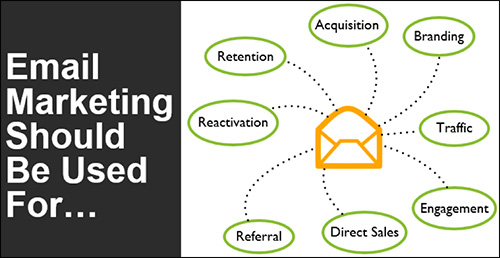
Graphic showing what email marketing should be used for

So how do you integrate email with everything else you’re doing to get great results like these? Let’s take a look.

Why do Email Marketing

Businesses turn to email marketing because it nearly always results in profit and growth. But here’s the thing…

Profit and growth should NOT be your goal.

Hear me out… Obviously profit and growth are central to any business-owner, entrepreneur, or marketer’s success. But when it comes to email, focusing on profit and growth FIRST creates a whole “cart before the horse” situation.

Your real goal with email should be to help customers move from one stage of the Customer Value Journey (CVJ) to the next. If that’s your primary focus, profit and growth will naturally follow.
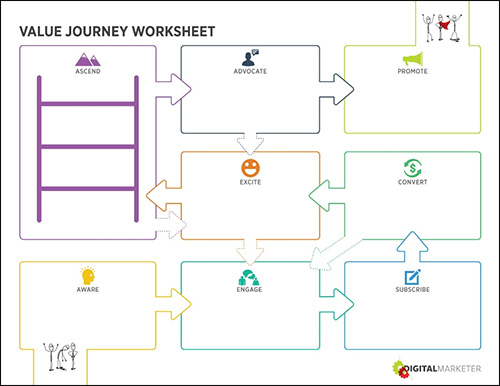
Image of the Customer Value Journey


(RELATED: Learn more about the CVJ and its role in your business’ growth here)

And if you do email marketing the right way, you can help your prospects along that path—en masse.

But before you start arbitrarily messaging your email list, remember… you can’t just wing email marketing and expect to succeed. There are rules, expectations, and processes you need to know.

The Rules of Email Marketing

Rule #1 in email marketing is to get permission before sending anyone anything.

That’s why it’s SO important to work with a respected email service provider. Today’s top providers offer templates, tracking, automation, and are optimized for mobile devices—all of which you need to succeed at email marketing.

You can’t just wing email marketing and expect to succeed.

If you’re struggling to choose the best email service provider, start here:

  • Infusionsoft
  • Campaign Monitor
  • AWeber
  • MailChimp
  • Constant Contact
  • Campaigner
  • Drip

Each of them will give you the tools to create permission-based email marketing campaigns that comply with email regulations (namely CAN-SPAM Act and GDPR).
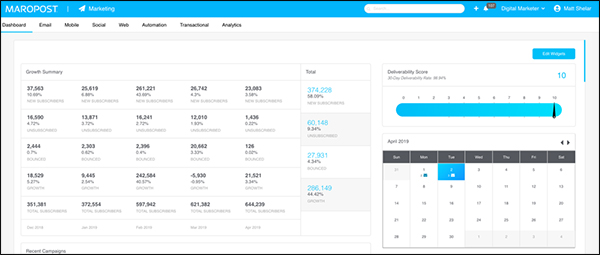
Email marketing needs an email service provider like Maropost

Maropost is the email service provider that DigitalMarketer uses

Rule #2 is to be fully transparent with your subscribers about what you are doing.

Let subscribers know what they can expect from you (the frequency and types of emails you will be sending). And be true to your word!

TIP: You can use your initial welcome email to set expectations with your subscribers.

Rule #3 is to be relevant and show your subscribers stuff that matters to them.

You want to train your subscribers to open and engage with your messages—and that won’t happen unless you always send relevant, useful information.

TIP: The best way to gauge this relevance is by regularly monitoring your open, click-through, and unsubscribe rates, as well as direct responses to your emails.
And rule #4 is to segment your list, that way the right emails are going out to the right subscribers.

This will raise engagement, lower complaints, and be a good source of data for you to use.

Now, let’s talk about how this works together to give you great results from email marketing.

How to do Email Marketing—Setting Up Your Strategy

A good email strategy starts with the specific outcomes you’d like to achieve…

Email marketing is about engaging with people, building trust, and sharing information that deepens your relationship with them.

But this process starts before they’re subscribed—ideally in the form of a valuable offering in return for permission to email them.

At DigitalMarketer, we call that initial offer a Lead Magnet, because it attracts the people who are most likely to be interested in a product and service.

What makes a good Lead Magnet? A good Lead Magnet is short, easily digestible, and offers immediate value.

Think in terms of:

  • Checklists
  • Instructional videos
  • eBooks
  • Lists
  • Samples

(RELATED: Read this post to learn more about growing your email list fast)

But once you have your subscribers, you then have to actually email them. And you want to make sure you carry over that value into your subscription. But like any type of digital marketing, you have to have a strategy (a good one) in place.

A good email strategy starts with the specific outcomes you’d like to achieve—things like brand awareness, lead generation, and sales (remember that profit should NOT be your main goal).

Like any tool, in order to use it properly, you need to determine what your success metric is. And in order to do that, you need to determine what your goals are.

Then, to achieve these goals, you’ll use a combination of 3 different types of emails:

  1. Transactional emails: which provide customer service (These are your invoices, electronic receipts, log-in credentials, billing notifications, etc.)
  2. Relational emails: which engage subscribers and nurture relationships with them (These are typically your content emails, but can really be anything that isn’t trying to drive a sale)
  3. Promotional emails: which are used to drive sales

As you can see in the chart below, each type helps you achieve different goals, so you’ll use a mix of them all.
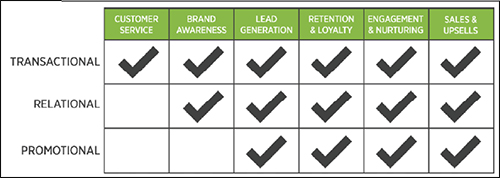
A checklist of what different email types can do

You can see examples of these emails and learn how to create them in the Ultimate Guide to Digital Marketing.

But you can’t just send 1 or 2 emails and expect to build a long-term relationship with your subscribers, which is where email campaigns come in.

(RELATED: Learn more about building your email marketing strategy here)

5 Types of Email Marketing Campaigns

A strategic email marketing plan aligns your messages to the stage of the customer journey your subscribers are in. And it automates as much as possible, so you don’t have to oversee EVERY email that goes out EVERY day (because honestly, who has the time for that?).

We call this approach the Email Marketing Machine (and you can read more about it here.)

Since you’re nurturing subscribers who are all at different stages on their journey, just one type of email campaign won’t cut it.

Since you’re nurturing subscribers who are all at different stages on their journey, just one type of email campaign won’t cut it. To engage everyone right where they’re at, you’ll use 5 unique campaigns:

  1. Indoctrination
  2. Engagement
  3. Ascension
  4. Segmentation
  5. Re-engagement

If you are new to this email marketing game, this may sound overwhelming. But don’t worry, I’m going to break down each of these campaign types, the stage of the customer journey they’re designed for, and how they work.

(NOTE: Tired of your email marketing being mostly guess work? Use this FREE plug and play guide and tracking sheet to track, analyze, and optimize your email marketing strategy. Download it here!)
Get your free guide to track, analyze, and optimize your email marketing strategy.

The Indoctrination Campaign

The indoctrination campaign is sent immediately after someone subscribes, and it’s designed to welcome them, set expectations, and get them excited about receiving your emails.

This campaign may be 3 or more emails, sent 1 day apart. While you can structure them any way you like, here’s a common formula for an indoctrination series:

  • Email 1 – Welcomes new subscribers and introduces them to your brand
  • Email 2 – Gives subscribers a gift or useful information
  • Email 3 – Sends subscribers some of your best content

Below is an example of an indoctrination email that DigitalMarketer sends.
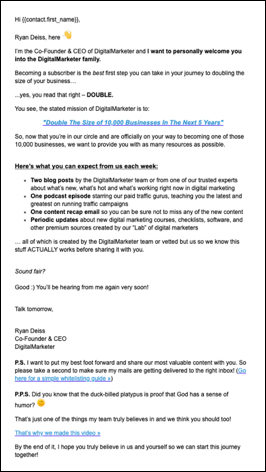
Example of an indoctrination email

Tip: Because this campaign is for BRAND NEW subscribers, you’re messaging potential customers when they’re the MOST excited to hear from you… So when it comes to this campaign, make sure it’s as cohesive as possible. Don’t be afraid to reference a previous email or tell them to look forward to the next email you’re going to send them.

The Engagement Campaign

This is a sales campaign triggered by a specific action your subscriber takes. For instance, if they click on a link in one of your emails, indicating they’re interested in Topic A, you’ll send a series of emails about a product related to Topic A.

The goal here is to turn subscribers into buyers by showing them the best offerings (and logical next-step in their journey) based on the actions they’ve already taken.

To map it out:

  • Explain that they’re receiving this information because of their interest in [topic]
  • Explain the offer/solution, and then overcome any objections to moving forward on that interest
  • Explain why taking this action is the next logical step, based on the previous action they took/actions they’ve taken

Below is an engagement email example from our own campaign at DM.
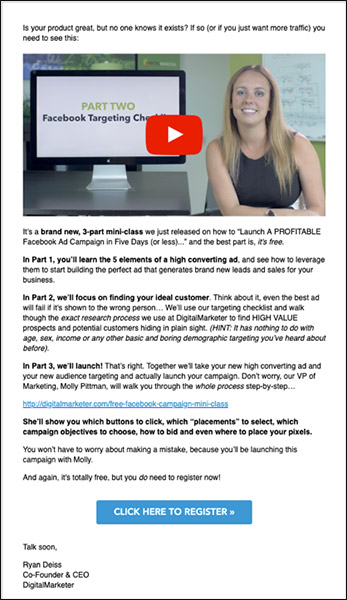
example of en engagement campaign email

The Ascension Campaign

The ascension campaign follows the purchase of a product, with the aim of “ascending” the customer, or moving them forward in their customer journey. Ideally, this turns one-time buyers into multi-buyers by letting them know right away what their next step should be.

Here’s how it works:

  • Congratulate them on the purchase they just made
  • Introduce the next step and overcome any objections to taking it now
  • Clearly spell out what they need to do now
  • Ask them to buy/take action

And here is an example from our campaign.
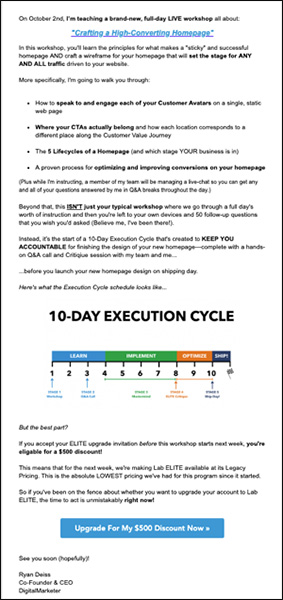
Example Ascension email

The Segmentation Campaign

This is a manual promotional campaign sent to your entire subscriber list in order to identify who is interested in whatever the topic is. Subscribers who click on a link are segmented, and then triggered into an engagement campaign.

Here are some ideas for segmentation campaigns:

  • Send content, such as blog posts, videos, or gated content
  • Make special offers, such as coupons, flash sales, or special promotions
  • Invite them to events, such as webinars, demos, workshops, or one-on-one consultations

This is one of the segmentation emails we send out.
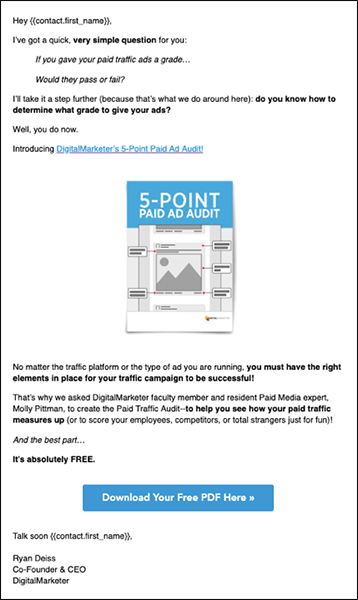
Example segmentation email

Tip: Segmentation campaigns—while potentially valuable as stand-alone campaigns—are typically sent to lower the barrier for entry into your ascension campaigns.

The Re-Engagement Campaign

The re-engagement campaign is triggered once a subscriber hasn’t opened or clicked an email in 30–90 days. It’s designed to re-engage them, so you can continue building the relationship and selling to them.

Here are the steps:

  • Identify subscribers who haven’t clicked on an email in the last 30–90 days
  • Give them a reason to re-engage with your emails
  • Update them on what they’ve missed, and then send them valuable content to get them excited about your brand again

Here is another DM example email.
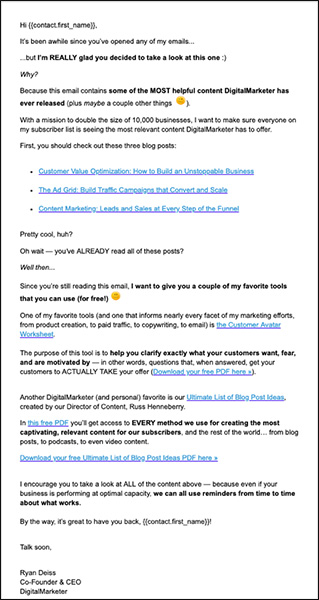
Example re-engagement email

If they re-engage, great! If not, add them to a separate list that you suppress from your typical emails, and then send them your best-performing email each week. (Keep in mind, these are NOT people who have explicitly indicated that they don’t want to hear from you. They just might need a reminder of the value you can bring them.)

Leveraging Email Automation

By now, you probably can tell: email marketing can be complicated. That’s why it can be so helpful to automate everything you can.

But you don’t need to know anything fancy about automation to do it. Your email service provider should have the process built in already. They let you send emails in 2 different ways:

As broadcast emails, which you create manually. (These are typically reserved for promotions and content emails.)

Or, as autoresponders, which are set up in advance to be delivered when someone performs a triggering action, such as clicking on a link, subscribing, or making a purchase.
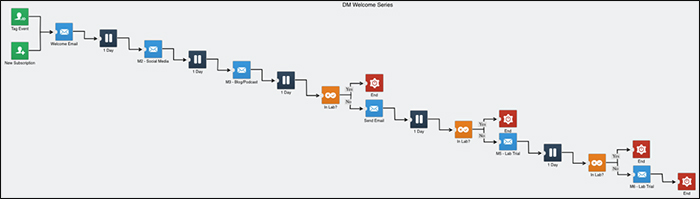
Email Marketing automation example

Here is the autoresponder map for the DM welcome series

It’s this second type of email you’re going to set up in most of these campaigns. And they’ll be triggered anytime your subscriber takes one of these actions:

  1. Subscribing
  2. Requesting a lead magnet
  3. Registering for an event
  4. Making a purchase
  5. Clicking a link in a segmentation campaign
  6. Abandoning a shopping cart
  7. Not engaging with your emails

So how do you set it all up?

Email marketing can be complicated. That’s why it can be so helpful to automate everything you can.

First, think about what you need to say to people when they take one of these triggering actions.

What do they need to hear?

Where are they on the Customer Journey?

How can you move them quickly and LOGICALLY to the next stage?

Then build your campaign and set the automation to go out whenever someone takes the appropriate action. It’s really that easy.

(RELATED: Want 3 plug-and-play email campaigns? Check out this post.)

How to Track Your Email Marketing Success

As with everything else in digital marketing, you can’t know what is working unless you look at the numbers.
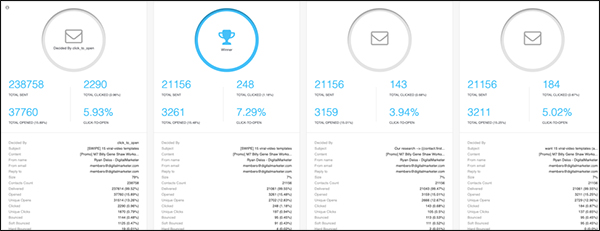
Email marketing metrics displayed on a site dashboard

Most email service providers will have these metrics all housed together like this…

Here are some of the numbers that will help you track your email marketing efforts.

List Growth: For this metric, look at your number of new subscribers and compare it to your number of unsubscribes. As you might expect, you want the ratio to be positive.

Delivery Rate: This is the percent of messages delivered to the recipient’s inbox relative to the number of emails sent. Aim for a delivery rate of 95% or more.

Open Rate: The percent of messages opened by the recipient relative to the number of emails sent.

Click-Through Rate (CTR): The percent of email messages clicked relative to the number of emails sent or, in some cases, relative to the number of emails opened.

Unsubscribe Rate: The percent of emails that lead to an unsubscribe relative to the number of emails sent.

Complaint Rate: The percent of emails marked as Spam relative to the number of emails sent.

Does Email Marketing Work?

In a word, yes!

Email marketing consistently generates the highest ROI of any marketing activity—that’s why it’s so important to get it right!

The key is to coordinate with your content and marketing campaigns so you can attract new subscribers, nurture those relationships, and quickly move them through the Customer Journey.

And you can’t just send out emails about new blog posts. You’ve got to build automated campaigns that segment, engage, and ascend.
The result? Emails that not only get opened, but also effectively grow your business.

(NOTE: Tired of your email marketing being mostly guess work? Use this FREE plug and play guide and tracking sheet to track, analyze, and optimize your email marketing strategy. Download it here!)

Get your free guide to track, analyze, and optimize your email marketing strategy.

The post What is Email Marketing? A Quick Guide to Getting it Right appeared first on DigitalMarketer.


from What is Email Marketing? A Quick Guide to Getting it Right

Virtual Reality is bad for eyes?

Hi, Warriors, i found a research which said that the use of VR can blind you, is it true ? Because i was going to buy Samsung VR for my Gami.

from Virtual Reality is bad for eyes?

SPI 365: Why Staying Small Is the Next Big Thing with Paul Jarvis

SPI 365: Why Staying Small Is the Next Big Thing with Paul Jarvis from The Smart Passive Income Blog.


from SPI 365: Why Staying Small Is the Next Big Thing with Paul Jarvis

#1738 Case Study: NatureBox and the viability of the subscription model

One of the big milestones for me was actually able to charge a subscription service for Mixergy. Before that point, I was doing these interviews for free and I was breaking my back doing it. All because there’s an idea out there that information wants to be free. But I saw that newspapers like The New York Times were charging. That’s why I’m excited about today’s interview. I think it will validate what I’ve always believed, which is everything should be on a subscription basis. But as you’ll hear in this interview, it doesn’t always work as well as I thought. Gautam Gupta is the co-founder of NatureBox, a subscription service for high quality, delicious snacks. I want to find out what happened to the business, how he started, how he’s growing it, how he’s got sales that really are amazing before and after he made this change from subscription.

Gautam Gupta is the co-founder of NatureBox, a subscription service for high quality, delicious snacks.

Sponsored by

Toptal – If you’re having trouble finding developers, Toptal is a network of elite pre-vetted software developers. You tell Toptal what you’re looking for, they search their network for the best people, they test the candidates, and then they present you with only the candidates who meet your individual needs. Once you pick someone you can start work with them the next day. They offer a no-risk trial period. Go to Toptal.com. Get the best of the best right now.


ActiveCampaign – Improve your marketing & sales processes by upgrading to an automated platform. Start sending follow-up that adapts to your customers’ behavior so you are sending the perfect message at the perfect time. You’ll have happier customers and higher conversions. See why over 150,000 marketers use ActiveCampaign to create intelligent marketing that gets better results.

If you’re with one of their confusing competitors and you want something new, you owe it to your business to check out ActiveCampaign.

More interviews -> https://mixergy.com/moreint
Rate this interview -> https://mixergy.com/rateint


from #1738 Case Study: NatureBox and the viability of the subscription model

Tuesday, April 2, 2019

Your Site Is Doomed!!!

There is a good change you knew that before setting up your site that it was doomed from the start, and in order to be cheap, your quality d.

from Your Site Is Doomed!!!

Episode 195: How to Use Facebook Ads to Grow Your Local Business

While you may see mostly ecommerce or national brands in your newsfeed, Facebook ads can be just as effective for local businesses if you use them right.

Molly Pittman is joined by Allie Bloyd, the marketer for a local home renovation company in Louisville, Kentucky. Allie is making 7-figures annually from $5,000–$7,000 in ad spend on Facebook. In this episode, she explains her audience targets, the copy she uses, and how she’s using Messenger campaigns to fill live events.

IN THIS EPISODE YOU’LL LEARN:

  • The content Allie is using to target cold leads—value driven, free or opt-in content based around initial home improvement FAQ’s
  • When to place your “Schedule An Appointment” campaign in your retargeting strategy
  • How she divides her ad spend among audiences—60% cold, 30% warm, and 10% hot
  • How to use copy to show that your business is local
  • How she’s built her comment-to-Messenger campaigns and the eight days of content subscribers receive

LINKS AND RESOURCES MENTIONED IN THIS EPISODE:

Allie’s Website
Clipman | Grow Your Ecommerce With Video
Episode 193: The 5-Step Social Media Strategy with Chris & Nick Harder

Thanks for joining us this week. Want to subscribe to The Perpetual Traffic Podcast? Connect with us on iTunes and leave us a review.

iTunes not your thing? Find us on Spotify, Stitcher, or TuneIn.

The post Episode 195: How to Use Facebook Ads to Grow Your Local Business appeared first on DigitalMarketer.


from Episode 195: How to Use Facebook Ads to Grow Your Local Business

Monday, April 1, 2019

Perfect for Parents: Passive Income & Building A “Perennial” Business (FS313)

How do we run a business that does not run us into the ground? Can we give energy into our hustle without having none left for anything else? How do we keep the wind in our sails?

The idea of managing the size of a business to suit your actual needs seems to becoming more and more attractive to a lot of entrepreneurs. It is something we have spoken about before on the Fizzle Show and we strongly believe you are the one who should decide the scope and ambition of what you do!

In this episode, we take this idea one step further and think about just how much and what kind of work you really need to do today. Rather than trying to reinvent the wheel, is there an obvious question that you see being asked that you know how to answer?

Today on the show we are joined by Nathalie Lussier who is a digital strategist, the founder of Access Ally and has made it her mission to help you achieve your dreams. We talk to her about automation, the customer’s journey, facilitating a good experience for an audience, improving the work you have already done and why you already have everything you need.

For all of this and more, join us today!

Listen to the episode:

Subscribe to The Fizzle Show in your favorite podcast player:

iTunes | Overcast | Pocket Casts | Stitcher | Soundcloud | RSS


Key Points From This Episode:

  • A quick introduction to Nathalie and her business. [0:03:26.4]
  • Switching the equation around so your business serves you. [0:08:30.7]
  • Breaking things down in past, present and future. [0:13:16.2]
  • Sustainable entrepreneurship and the value of service. [0:15:26.6]
  • The vital lessons that we learn in trying times. [0:19:17.4]
  • The expert’s dilemma and getting perspective on your own value. [0:22:40.7]
  • The patterns that helped Nathalie discover her gifts in plain sight. [0:26:35.5]
  • How Nathalie’s answered the questions she was encountering. [0:31:35.3]
  • Moving forward with freebies towards paid services. [0:35:54.7]
  • Fighting your own battles and slaying your own dragons. [0:41:02.8]
  • Nathalie’s business preparation for having her baby. [0:46:51.2]
  • The architecture of online business and the customer journey. [0:51:54.1]
  • Stamina and dedication to bettering a single offer. [0:54:32.6]
  • Post mortem, taking stock and dialing it all in for updates. [1:00:49.4]
  • Honoring the work already done and doubling down. [1:04:40.7]
  • You already have what you need! [1:08:01.1]
  • And much more!

Links Mentioned in Today’s Episode:

The post Perfect for Parents: Passive Income & Building A “Perennial” Business (FS313) appeared first on Fizzle.


from Perfect for Parents: Passive Income & Building A “Perennial” Business (FS313)

How to Design Facebook Ad Images Like a Pro (…When You’re Really an Amateur)

Ah Facebook Ads…

We all struggle to get a good conversion rate, sometimes (especially with some of the recent changes to what works on Facebook).

But then there are other times when you know that your product or service is up to snuff and your copy is on point, yet your ads are still coming up short.

Well guess what?

The best product in the world won’t get sold by ads with sub-par design.

But don’t worry. I’m here to show you how to design your ads so that nobody needs to know you aren’t a designer.

Ad creative is arguably the easiest factor to test when creating or troubleshooting ad campaigns. And frankly, you don’t have to be an expert to create eye-catching ads that stop the scroll.

I’m going to break down what makes a “good” image and show you 4 step-by-step ways to design your own Facebook ad images—and the best part is, you can do it all without having to spend a dime.

Let’s jump into the first, and most important, characteristic of your Facebook ad.

1. Simple, Clear Representation of the Marketing Message

When it comes to successful Facebook ads, 1 thing is apparent—the offer and the messaging is the most important part of your ad. Regardless of how well designed your ad image is, if your message isn’t clear, you won’t be getting any clicks.

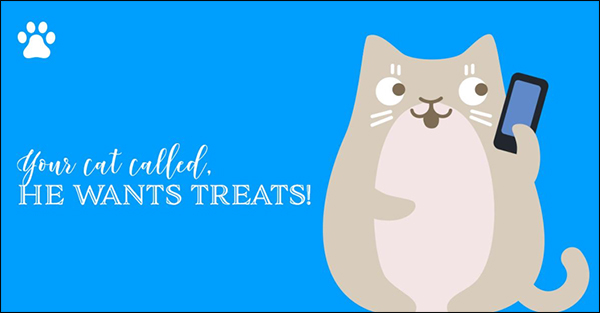
We’re a pet-friendly group here at DigitalMarketer, so for the examples in this post, we are going to be looking at and creating ads for a fictional brand, Pets of DM.

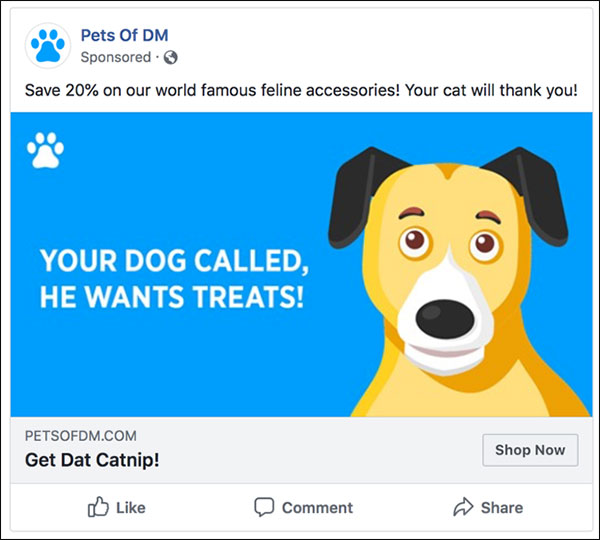
Facebook ad designed with bad ad copy

Notice anything wrong with this ad?

For example, using this image of a dog when the rest of the ad copy is about cats doesn’t really make much sense.

Facebook ads are comprised of several elements, with the image being only 1 of them. So you need to make sure that it fits in with the rest of your ad as well.

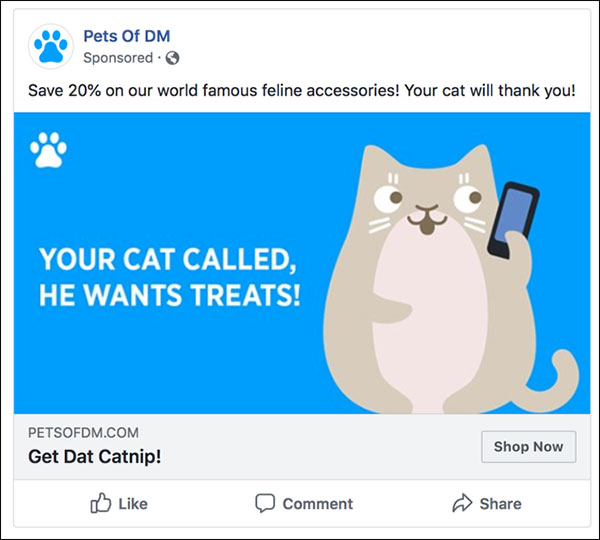
Facebook ad designed with correct copy aligned with image

Keep your messaging consistent

This looks better, right?

You also want to make sure the message of the ad is consistent with the landing page you are directing traffic to. This is known as ad scent, and you want the messaging and the imagery on the ad to resemble that of the landing page as well.

2. Choose Complementary/Contrasting Colors That Stand Out

Most people aren’t going on Facebook to browse the ads that show up in their newsfeed, so you need to make sure your ad stands out and grabs their attention. One of the easiest ways to do this is by choosing colors that are less likely to blend in with the rest of the newsfeed posts.

Choosing colors is often made harder than it needs to be. For some businesses, like DigitalMarketer, we have branding guidelines that we stick to in order to keep the feel consistent across all of our content.

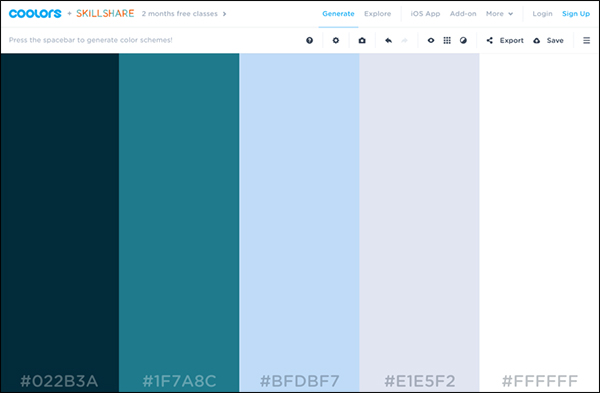
If you don’t have a set color palette to work with, using a site like Coolors.co to generate a palette for you is an easy way to make sure the colors work well together and look professional.

example palette from Coolers.co

Example of a color palette from Coolors.co

3. Use Relevant, High-Quality Images

When you’re creating image ads, the last thing you want is for your ad to come off as cheesy or unprofessional by using low-quality clip art or stock photos. There are more and more resources made available every day, and finding high-quality photos and illustrations isn’t as difficult as it might seem.

The most important thing you need to look at when choosing images is the licenses that are associated with them. Pulling images from a Google image search is a big no-no, and you need to make sure that you are legally able to use the images you choose, or you can easily find yourself in hot water for copyright violations.

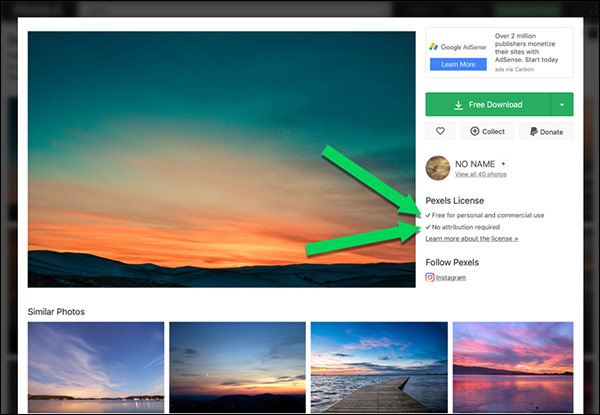
The rule of thumb here is that if you aren’t explicitly given permission to use an image, then avoid it all together. Look out for images that are free for commercial use, and require no attribution. Pexels.com is a great resource for stock photos, and the licenses are shown front and center, so there is no question as to whether or not you can use an image.

example images from Pexels to use when designing your Facebook ads

Example Pexels.com search for sunsets

Showing where the attribution/copyright rules are

Make sure it is free for commercial use with no attribution required

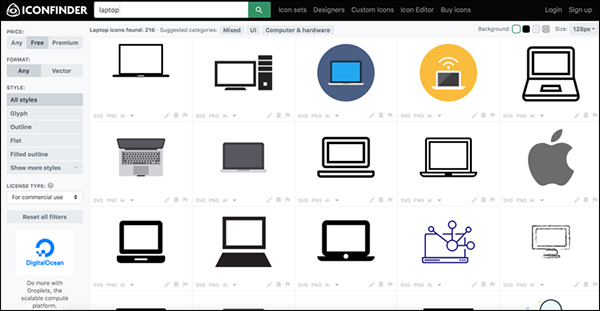
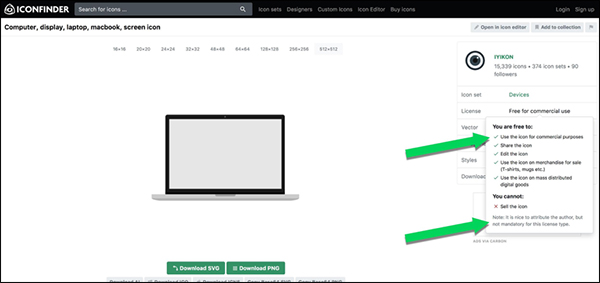
If you’re looking for illustrations, Iconfinder.com is a great resource. The same rules apply to illustrations as photos, and you need to make sure the license allows you to use the image in your ad.

Showing icons to use when designing Facebook ads

Example Iconfinder.com search for laptop illustrations

Showing attributions and copyright requirements for icons

Make sure the illustration is free for commercial use and does not require attribution

4. Go Easy on the Text

When designing your ads, you don’t need to put tons of text on your images. In fact, you should only use a small amount of text, such as highlighting your offer or including a call to action.

If your ad needs a lot of explanation, keep that in the ad copy and not on the image itself. Facebook will limit the reach of your ad if you have too much text.

(NOTE: Not sure where to get started on your own Facebook ads? Download our NEWLY UPDATED Ultimate Facebook Ad Template Library for FREE! You can copy and paste these 7 proven Facebook ad campaigns to create low-cost, high-converting ads on demand. Get them here.)

Facebook Ad Template Library Lead Magnet

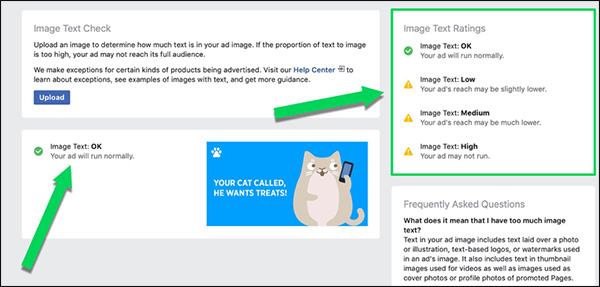
This was previously known as the 20% rule, and Facebook would not approve ads in which 20% or more of the image contained text.

Now, ads that are heavier on text may approved, but the ad’s reach is determined, in part, based on the amount of text included in the image.

Facebook provides this guide to give you a better understanding of the amount of text you can include. But just to make sure, you should always check your image using Facebook’s overlay tool before submitting an image as part of an ad campaign.

Showing results for designed Facebook ad tested for overlay text

Always test your ad images with Facebook’s overlay tool 

Since you are limited to the text you can fit on your images, you should make sure that real estate doesn’t go to waste. Choose fonts that are easily legible and not distracting. You should use a maximum of 2 fonts, but if you can, choose just 1 and stick with it.

Example of designed Facebook ad with bad font choices

Avoid using distracting or hard-to-read fonts

This is an example of what can happen if you try and get too “cute” with your font choices. Compared to the example we showed earlier, which one looks more professional and is easier to read?

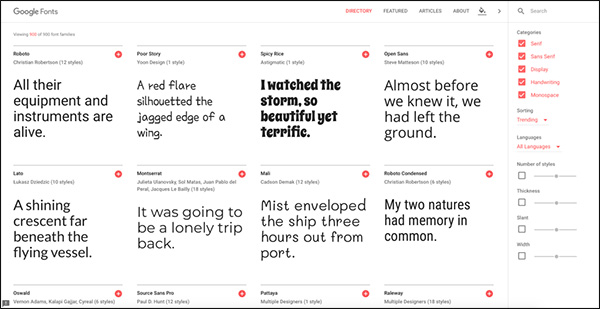
Just like images, you also need to make sure your fonts are licensed to use commercially as well. Google Fonts is a great resource, and all of the fonts in their library are licensed for commercial use without attribution.

Example fonts from Google Fonts to use when you are designing Facebook ads

Google Fonts has hundreds of free commercially-licensed fonts for you to choose from

Creating Your Ad Images

Now that you’ve narrowed down your marketing message, color palette, images, and fonts, it’s time for the fun part of actually creating your ads! We’re going to look at some examples of real ads that big companies are using, and then we will show you how easy it is to make them on your own.

(RELATED: Check out this 7-Step Facebook Ad Plan to learn how to get started on your own campaign)

To continue with keeping things free, I am going to show you how to make the images using 2 different free tools: Apple Keynote, and everyone’s favorite online editor, Canva.

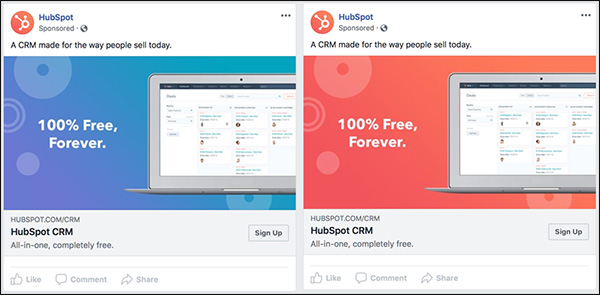
Example 1: Hubspot

Two versions of an example Facebook ad from Hubspot

In this example, you can see that HubSpot is running 2 variations of the same ad with different background colors. We are going to recreate our own version of this ad to go along with our fictional brand, Pets of DM.

For this example, we are going to use Keynote.

How to Design Facebook Ad Images in Keynote

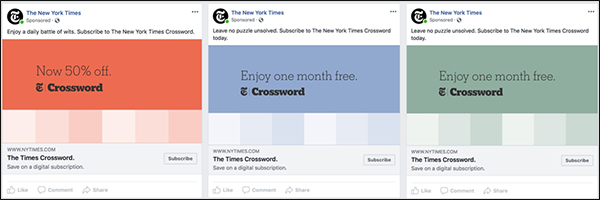
Example 2: The New York Times

Example Facebook ad from The New York Times

The New York Times is using several different variations of the same template in this example. This ad concept is fairly simple, and it keeps the focus on the offer without distractions.

This type of simplicity could work well in a retargeting campaign where you are showing the offer to someone who is already familiar with your brand.

We are going to use Canva to make this example.

How to Design Facebook Ad Images in Canva

You should now be able to design Facebook ad images and look like a pro, even if you have no design experience at all.

As long as you follow these 4 guidelines, your ads will be bringing you in leads and conversions before you know it.

(NOTE: Not sure where to get started on your own Facebook ads? Download our NEWLY UPDATED Ultimate Facebook Ad Template Library for FREE! You can copy and paste these 7 proven Facebook ad campaigns to create low-cost, high-converting ads on demand. Get them here.)

Facebook Ad Template Library Lead Magnet

The post How to Design Facebook Ad Images Like a Pro (…When You’re Really an Amateur) appeared first on DigitalMarketer.


from How to Design Facebook Ad Images Like a Pro (…When You’re Really an Amateur)

How Much Do Twitter Ads Cost? Check This Out!

Ahhh. Twitter Ads. That untapped source a lot of people are just ignoring because it’s not as famous as other ad platforms like Facebook, Instagram or Google Ads. For years I’ve been just ignoring Twitter Ads as well as we already have learned and kind of dominated many traffic sources and we can’t really learn more than 1 or 2 per year. But a couple months ago I started wondering: How much do Twitter Ads cost? Are Twitter Ads worth a shot?

And now I’m here writing this post after 2 months of testing so you don’t have to spend your own money to figure it out.

Let’s get started!

First of all, keep in mind I’ve been using Facebook Ads since 2013. My first approach to paid traffic happened after one of the algorithm updates where Facebook decreased my reach from 10% to less than 1% of the fans on one of my viral pages. Not surprisingly, they still do this from time to time as they tune their algorithm every 6 months or so.

Stream SEO has always been a site focused on organic traffic, so while I have spent 6 figures with FB ads in the last years running affiliate marketing or simply building and growing other websites for me or my partners, I have never focused that much on running FB ads for Stream SEO directly.

I have used Facebook Ads in the past to sell eComm products like T shirts, Print on Demand products and running affiliate offers. We even used FB Ads to launch a course in 2017-2018 and it’s my favorite traffic source to kickstart a project.

It is also the most competitive social ad network to work with, and the prices have risen every year since 2013. Yet many people ignore other sources like Twitter Ads or Linked in because we know they aren’t the biggest players and there isn’t a ton of information around to learn how to master those paid traffic sources.

I am one of those who ignored Twitter Ads for the last 6 years but finally in 2019 I decided to start testing them. My goal in this post is to simply make a test to see how good of a fit can Twitter Ads be for bloggers and small entrepreneurs that want to learn how to use Twitter to start getting traffic.

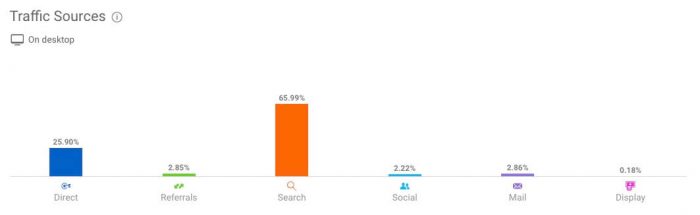
Here’s a view of Stream SEO’s traffic sources distribution according to SimilarWeb:

how much do twitter ads cost - stream seo similarweb

SimilarWeb isn’t 100% accurate but it gives you a good idea of where my traffic is coming from in Desktop devices.

Social represents only 2% of my traffic according to them, and that’s pretty low. Even email has a higher percentage but I send emails every time I write a new post so it shouldn’t be a surprise.

Close to 70% of my traffic comes from organic searches and that number is close to what my Google Analytics reports say.

Am I a Twitter hardcore fan?

The answer might be obvious but in case you haven’t noticed, I’m NOT a super fan of Twitter.

The social network I use the most is Facebook, since I also use it to keep in contact with my friends and family with the messenger application.

After that it’s probably a match between Instagram (which is completely connected to FB), Twitter and Reddit.

But I use Twitter for a very different reason than Instagram and FB. I use Twitter mostly to learn and contact people in the industry. That means I’m not watching videos of cute cats on Twitter as opposed to Instagram and I’m not watching the latest photos of my parent’s trip as I do on Facebook.

They all have different purposes, and for me Twitter is a place to learn and keep up with industry related stuff and also a place I lurk every day for 15-20 minutes.

Just to give you an idea, I almost never tweet and my average number of tweets per month is close to 0. Some months I tweet a couple times. Some months I don’t tweet at all.

I’m mostly a lurker…

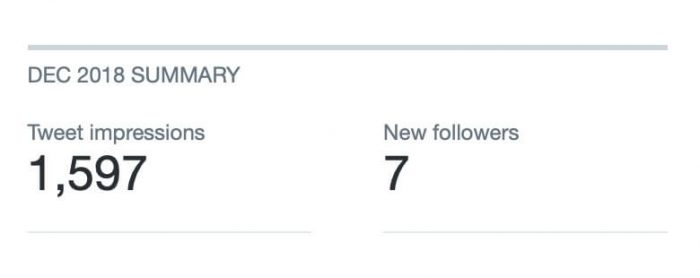
My Twitter account had around 2,100 followers in December 2018 and between a Tweet and maybe a couple of Retweets from people mentioning me I reached 1,597 accounts and got 7 new followers.

how much do twitter ads cost - twitter no ads december

Some months I get 5 new followers. Some months I get 1 new follower. All because of my inactivity. In fact, I wouldn’t have 2,100 followers if it wasn’t because I l ink to my account here at Stream SEO’s sidebar.

Now I don’t know about you, but if you compare a reach of 1,600 having 2,100 followers, you’d know Twitter has potential if you compare it to Facebook Fan Pages, where my organic reach could be 100 persons from 6,000 followers.

So, I decided to make a test and be a bit more active in January 2019 just to see how good was the reach in my account. I posted about 4-6 tweets (although later I had to delete some of them due to a plugin error from WP). And also commented and retweeted a few more times than normal.

The result:

how much do twitter ads cost - twiiter no ads january

22 new followers and a reach 3 times higher than my followers account. It’s like going viral on FB back in the old sweet days where you didn’t need to pay for ads!

And so, I decided to make a simple experiment with Twitter Ads to see how it could affect my followers account and engagement, as well as if I could use it to drive traffic to my website (Stream SEO).

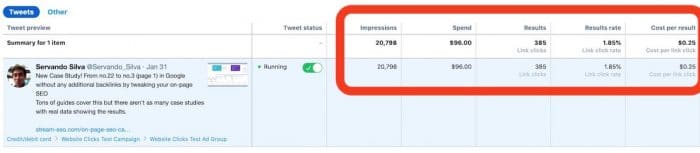
At the end of January, I started running Twitter Ads and so far, I’ve spent almost $100 in the last couple months, with a total of over 20,000 impressions JUST from the ads.

how much do twitter ads cost - twiiter ad spent

Now I wanted to keep this test small and simple because for bloggers who want to take a shot at Twitter Ads, they probably won’t spend 4 figures per month at the beginning. Most bloggers could spend a few dollars per day and then if they see good results it would be good to consider scaling things up.

$100 is a small budget that I think most bloggers can set aside for their blogs on a monthly basis as long as it’s already making some money.

But this limited budget also means I can’t run many tests yet. I’ll be updating this post in the future with more tests in different countries, devices, twitter types of ads, etc.

My main focus in this 2 months test with a $100 budget was mainly to drive traffic to a post, as that’s what most bloggers would probably focus on (either that or lead generation).

Twitter Ads Cost – The results

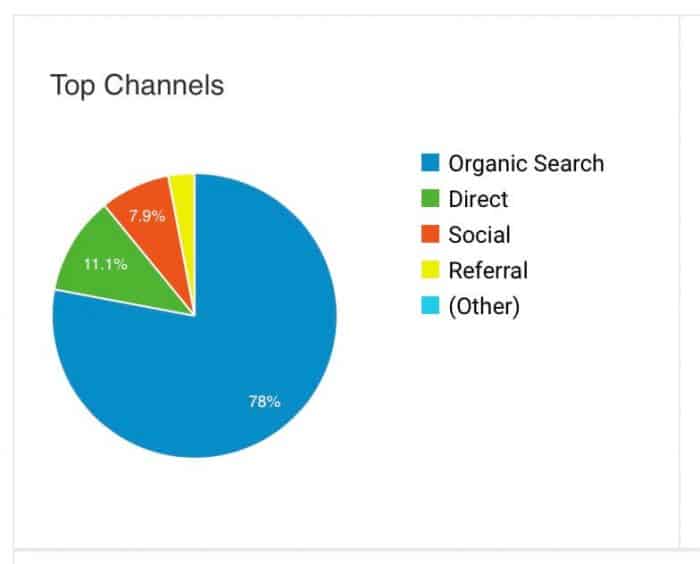
According to Google Analytics I received 7.9% of social traffic here at Stream SEO in the last 30 days. That’s quite an increase from 2% if we remember what SimilarWeb said about my site.

how much do twitter ads cost - stream seo traffic channels

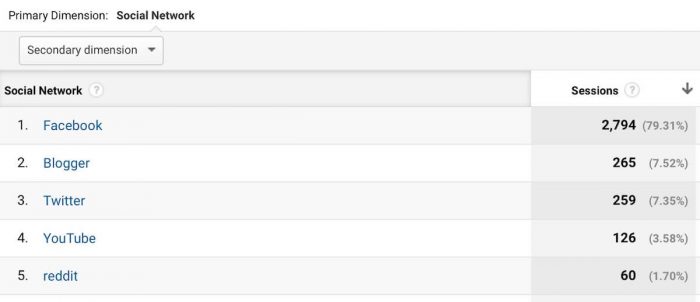
If we see the detailed information per social network you’ll notice Twitter is at spot number 3, with 259 visits in the last 30 days. Blogger (I don’t really count it as a social network but whatever) has sent a similar amount of traffic and then a similar amount come from Youtube and Reddit as well. I don’t focus on reddit or Twitter though.

how much do twitter ads cost - stream seo social channels

Facebook has 10 times more traffic than Twitter in the last 30 days because I decided to make a test with FB ads so we could compare them to twitter, but I’ll explain that later.

In this test I decided to keep it simple. Once you have a Twitter account and depending on which country you live, you’ll see twitter asking you to promote posts automatically by using their “Promote Mode” where pretty much every Tweet you do no matter what it is about gets an impulse and reaches more of your followers.

This feature is similar to Facebook’s automatic Boost post that promotes all of your posts to your fans and their friends. While this strategy sounds interesting in paper, in reality is mostly sucks and it’s a way to make Twitter and FB more money in the long run.

If you really want to start harnessing the power of FB or Twitter, you need to go into segmentation and prepare the post for your audiences.

In the case of Facebook, you add interests and segment your audience by gender, ages, devices and other filters.

With twitter Ads, you add twitter accounts so you can promote the posts to their followers and you can also filter things like devices, countries, carriers, etc.

To keep it simple in this case study and considering most bloggers will get started by sending traffic to their posts, I selected one of my latest case studies published in the blog around SEO and boosted that post in my accounts.

Here are the results and costs for Twitter Ads:

how much do twitter ads cost - campaign results

With close to $100 spend, the results are:

  • 20,798 impressions
  • Average CPM of $4.6 (not so expensive)
  • 385 clicks
  • 1.85% CTR (pretty average number. I wouldn’t consider it good)
  • $0.25 CPC or cost per result

Keep in mind this is a campaign I targeted at the USA, and we all know how USA is one of the most competitive geos in every ad network.

I added several twitter accounts in this case of people who could be interested in the SEO case study including: ahrefs, smartpassiveincome, mattdiggity, semrush, etc. I also left both mobile and desktop traffic for this campaign enabled.

That’s around 4 clicks per buck, which isn’t that bad if the traffic is well segmented and targeted for the USA.

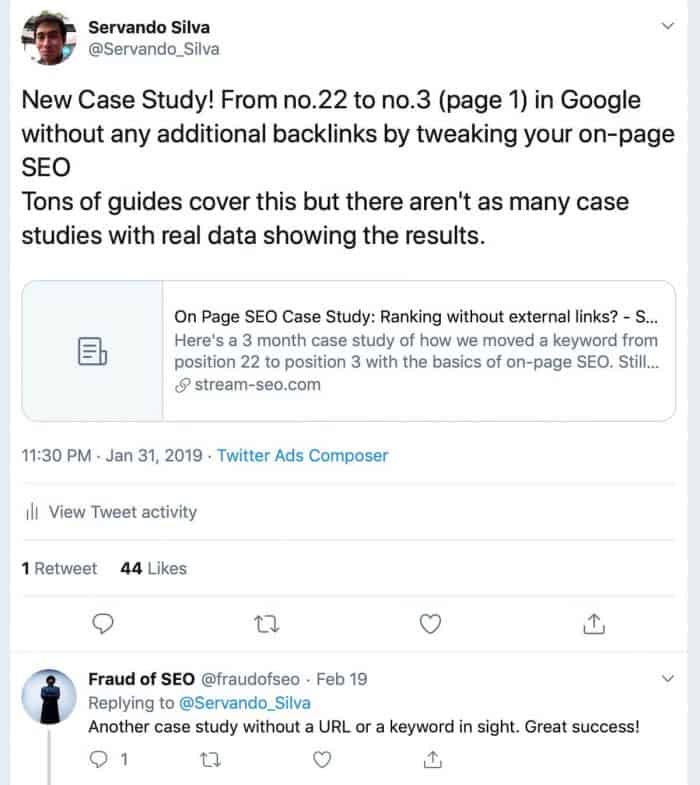
Here’s the ad and the results it got besides the traffic we received during this days:

how much do twitter ads cost - twitter engagement

I left that comment on purpose because from the 385 clicks I received, only 1 person retweeted the post and 44 liked it, yet the only comment we got was one implying I’m a fraud LOL.

I wonder if the tactic of calling someone a fraud so they feel chickened and reveal their URL works for real, but obviously I wasn’t going to reveal the URL if the case study to get much more competition. It’s just plain dumb.

Overall, my Twitter account did notice a good change of impressions and also profile visits.

We went from 6,000 impressions per month in January to 16,400 impressions per month in March:

how much do twitter ads cost - twitter ads march

Twitter also says I got 459 profile visits, which is a lot, but only increased 6 followers, which is weird because I’ve been getting 2-3 new followers every day in my account since I started running ads. We went from 2,100 followers to 2,308 followers as of now in the last 2 months, which means we got 200 followers in the last 60 days.

Like I said, around 3 new followers per day… yet Twitter says I only got 6 new followers???

Twitter Ads vs. Facebook Ads for Bloggers

As I mentioned above, having an idea of the actual cost per follower you can get on Twitter Ads is one thing, but comparing it to another platforms helps you get a better idea in case you want to get started with any of them for the first time.

Since I’ve been running Facebook Ads for 6 years, I obviously selected this platform to run against Twitter and we got some interesting results:

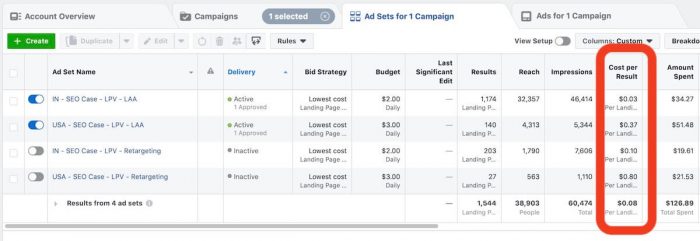
how much do twitter ads cost - facebook vs twitter comparison

First of all, let me be clear and tell you that we ran the same case study to my audience with FB Ads. I spend around $136 but around 40% of that test came from India, which represents another huge sector of entrepreneurs that read my blog on a daily basis.

In the future I will be testing more and more countries, including Canada, UK, some other tier 2 European country and another tier 3 country like India to gather more data and results for this case study. Make sure you subscribe for future updates in the opt in forms!

Back to the results, my setup was very similar as in Twitter. We targeted the audience by interests to people who were passionate about SEO or followed bloggers and tools in the space. Other than that, we just selected the country and we left both mobile and desktop traffic enabled.

If the image isn’t very clear here are the final results of running with Facebook Ads in the USA (same as twitter):

  • USA – Interest Targeting: $0.37 per visit – $9.6 CPM – 140 landing page views
  • USA – Retargeting test: $0.8 per visit – $1.4 CPM – 27 landing page views

And for the same test in India:

  • IN – Interest Targeting: $0.03 per visit – $0.73 CPM – 1,174 landing page views
  • IN – Retargeting test: $0.1 per visit – $2.5 CPM – 203 landing page views

The retargeting test was just trying to reach anybody who would have visited my blog in the last 30 days and it had a way lower impact with more expensive results. I made that just for fun.

However, the interest targeting in the USA got a CPM twice as high as the one we got with Twitter ads and the cost per visit was 50% higher as well.

So, in this case Twitter Ads wins because it’s less expensive and generated more clicks per dollar spent. $0.25 on Twitter vs. $0.37 on Facebook.

I would also say Twitter wins in the follower’s area because the reach on Twitter will be several times higher than the reach a Facebook Fan Page can do organically, so a Twitter follower is much more valuable than a Facebook Fan.

I would also like to point out that my Facebook traffic tests are not focused on website clicks but on landing page views. Usually when somebody clicks your ad it’s pretty likely they’ll end up in your site unless your site is very slow to load or they tapped on your link by error (this can happen much more often in mobile phones).

Because of this, Facebook has a better metric called landing page views which only counts traffic that actually got into your site after clicking your ads, using their Facebook pixel. In theory this means Facebook results have a bit higher quality than Twitter Ads, but who knows for real.

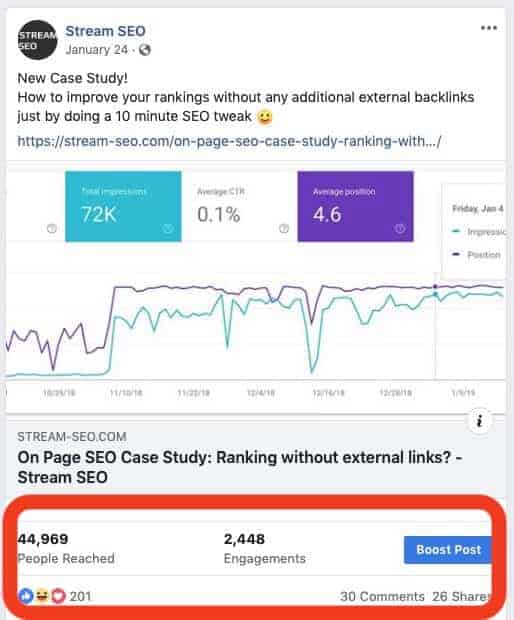
Finally, here’s the result of my post on FB:

how much do twitter ads cost - facebook engagement

Contrary to Twitter, Facebook got a lot of engagement, comments and even 26 shares. The Fan page also grew 110 fans in the last 30 days as a result of this ad.

However, we all know how reaching those 100 fans is a pain in the butt if you don’t pay for it later.

Digging in the advanced reports allowed me to notice that most of the comments and shares in this posts come from India. 90% of them actually, which means the results of running just in the USA would have been 10 times lower (i.e. around 20 likes, 3 comments and 3 shares instead).

Conclusions – Are Twitter Ads worth the cost?

In my opinion, it’s a traffic source that’s worth testing. Obviously, every niche is different and we’ll get different results, however you now at least have an idea of how much do you pay per visit.

Overall the results seem to be similar on Twitter, maybe even lower than Facebook and that’s always good. There are many things I still need to split test in the future.

First, I want to run ads in different countries just to see if there’s a huge price difference as it happens with Facebook.

Also, I’d need to test a bit more on how much you can scale them based on your audiences, but this time I wanted to keep it real and use a budget that most bloggers could test.

Twitter also has a pixel and a ton of features I haven’t tested but I’ll keep learning how to use their platform in the following weeks and keep you posted.

Is there anything you’d like to see in an updated version of this case study? Please let me know in the comments!

The post How Much Do Twitter Ads Cost? Check This Out! appeared first on Stream SEO.


from How Much Do Twitter Ads Cost? Check This Out!

Inspo / Peoples Journeys

Hey There! Was wondering if anyone here has a thread where they are documenting their journey and keeping a running blog of progress. In.

from Inspo / Peoples Journeys

Website Analysis Tools

SEO Site Checkup is a great tool that lets you address page speed at the same time you're looking into other search engine optimization factors.

from Website Analysis Tools

20 Entrepreneurs Reveal their First Hire Story: How & When They Grew Their Team

Take your business to the next level by making your first hire! Learn from 20 entrepreneurs who reveal their first hire story today on the blog!

20 Entrepreneurs Reveal their First Hire Story: How & When They Grew Their Team from The Smart Passive Income Blog.


from 20 Entrepreneurs Reveal their First Hire Story: How & When They Grew Their Team

#1737 The company making Amazon arbitrage sexy

Joining me today is an entrepreneur who created a company called Zinc, which builds tools for entrepreneurs–especially those who are competing against the big guys. In his words, he says, “Look, we’re here creating software for anyone who wants to level the playing field against Amazon.” We’ll get into exactly what that means and how you can apply it to your business. Max Kolysh is the founder of Zinc.io, a software that builds list creation, inventory management, repricing and fulfillment.

Max Kolysh is the founder of Zinc.io, a software that builds list creation, inventory management, repricing and fulfillment.

Sponsored by

Toptal – If you’re having trouble finding developers, Toptal is a network of elite pre-vetted software developers. You tell Toptal what you’re looking for, they search their network for the best people, they test the candidates, and then they present you with only the candidates who meet your individual needs. Once you pick someone you can start work with them the next day. They offer a no-risk trial period. Go to Toptal.com. Get the best of the best right now.


ActiveCampaign – Improve your marketing & sales processes by upgrading to an automated platform. Start sending follow-up that adapts to your customers’ behavior so you are sending the perfect message at the perfect time. You’ll have happier customers and higher conversions. See why over 150,000 marketers use ActiveCampaign to create intelligent marketing that gets better results.

If you’re with one of their confusing competitors and you want something new, you owe it to your business to check out ActiveCampaign.

More interviews -> https://mixergy.com/moreint
Rate this interview -> https://mixergy.com/rateint


from #1737 The company making Amazon arbitrage sexy

Spam, spam and spam: Explained

Many of us who have been around the internet for a long time are familiar with this while many of the younger people are not. Back before CAN-SPAM ...

from Spam, spam and spam: Explained