Wednesday, July 18, 2018

SPI 327: How to Write Copy that Sells with Ray Edwards

CONTENT WARNING: You’re going to want to have a pen and paper handy for this one. Today we’re talking with Ray Edwards, a fan favorite from Episode 182 and Episode 300 and a member of my mastermind group. Today he’s going to teach us how to write copy that sells—written words that encourage readers to take action and result in profitable sales. Stick around!

Knowing how to write solid marketing copy for your business isn’t nearly as simple as it might seem. In fact, it’s really one of the most important parts of running an online business, particularly when it comes to selling. So how can you do it well? How do you write engaging, strong, and convincing sales copy?

Ray is here today to give us techniques, hints, and blueprints for doing exactly that! Like I said at the top, you’re going to want to take notes. In this episode you’ll learn how techniques like the PASTOR model and If, Then, Lead can help you outline and craft powerful copy, connect with your audience, and drive successful sales. Did I mention that you should take notes? Scroll below for a special, twelve-step infographic from Ray for understanding The Buyer’s Journey!

If you’re looking to hire a professional copywriter for your business, check out Ray’s ESP (Endorsed Service Providers) list. It’s in the navigation bar of his website, RayEdwards.com. And if you enjoyed this episode, look out for Ray’s book, Permission to Prosper, coming out in March 2019.

The Buyer’s Journey, courtesy of Ray Edwards

A twelve-step infographic of The Buyer's Journey, by Ray Edwards

If your business has anything that includes a subscription model of any kind, recurring payments and the like—you’re going to want to pay attention to this. Commonly we entrepreneurs experience failed payments, which can be frustrating. I didn’t even realize how much I was losing until I got on board with a company called AllGravy.io. That might sound familiar if you listened to Episode 312 with Casey Graham, who put the company together to help people recover failed payments. A lot of shopping carts use auto features to try and recover payments, which is pretty standard, but AllGravy.io is a team of real humans who get involved with your brand and reach out to customers in a friendly, very non-scary way. They’ve recovered tens of thousands of dollars for me from failed payments I didn’t even know were happening. I’m sure they can make a huge impact for your business too. Check out AllGravy.io/pat—it literally pays for itself. I love this company and what they do for others.

Thanks for Listening!

To share your thoughts:

To help out the show:

  • Leave an honest review on iTunes. Your ratings and reviews really help and I read each one.
  • Subscribe on iTunes.

Special thanks to Ray Edwards for joining me this week. Until next time!


You'll Learn

  • How the PASTOR model can help you make successful sales.
  • Why including different types of urgency in your copy is huge for increasing sales.
  • Why you should write your copy when you're in an excited state.
  • Why 80 percent of your sales copy should be about connecting with your audience.
  • How to use the Instant Empathy Exercise to write incredible sales copy.
  • How to use the If, Then, Lead technique when writing copy.
  • Why your job is to be Yoda (rather than Luke Skywalker) on your buyer's journey.
  • Why you should prove to buyers that your solution is worth 5-10x more than you're asking for it.
  • How to craft the perfect bonus for your pitch.
  • How to hire a professional copywriter for your business, and more!

Resources


from SPI 327: How to Write Copy that Sells with Ray Edwards

Seven Sure-Fire Ways to Annoy a Blog Editor (and What to Do Instead)

The post Seven Sure-Fire Ways to Annoy a Blog Editor (and What to Do Instead) appeared first on ProBlogger.

Ways to annoy a blog editor

This is a post by ProBlogger writing expert Ali Luke.

Are you (inadvertently) annoying bloggers you want to impress?

If you’re hoping to build a great relationship with a blog editor – maybe so you can land a guest post, or interview them on your blog – then this post is for you.

Because you might just be getting yourself on their blacklist without even realising.

For ten years, I’ve been the owner-editor of my blog Aliventures. I have an assistant for some admin tasks, but emails still come through me. And while my blog definitely isn’t the biggest out there, I still get a fair number of annoying emails.

Back in 2013–14 I spent some time editing Daily Blog Tips, where I fielded a lot of comments, enquiries, guest post requests, and so on.

With both Aliventures and Daily Blog Tips, I’ve had plenty of wonderful interactions with lovely readers. But a few readers obviously didn’t realise their comments or emails were guaranteed to irritate me.

Some of the mistakes I’m about to go through might seem fairly obvious; some might not. I’ve tried to explain why each one is so annoying to an editor.

If you’ve been making some of these mistakes, don’t worry. None of them are awful, just annoying. And all you need to do is avoid making them in future.

#1: Leaving a Comment With a Keyword as Your Name

Have you ever seen (or even left) a comment on a blog with the name field filled in as something like “SEO guru” or “India Travel Tips” or “Top Freelance Writer”? I can understand why people do this. Even though it won’t help you rank for that keyword (links in comments are no-follow), it might tempt a curious reader to click on your name and visit your site.

Using a keyword as your name is really irritating for the blog editor. It looks shady and spammy. And no-one wants any part of their blog, including their comment section, to look like that.

It’s also a technique often used by actual spammers. So for many blog editors, seeing a keyword in the “name” field of a comment is such a red flag that they’ll delete your comment altogether.

Instead: Use your actual name. (If you don’t want to use your full name, just use your first name). It’s not that hard. And don’t think you can get round this with something like “Ali Luke | Top Freelance Writer”. While a blog editor might let it stand, it doesn’t leave the best impression.

#2: Sending Vague, Unanswerable Questions by Email

While I welcome emails from readers, and an always happy to answer a question or two, sometimes their emails just leave me scratching my head.

They’ll be something like, “I want to write stories, please can you help?” or even “How do I become a writer?”

If I only received one email like this it wouldn’t bother me. But when I get similar emails regularly, I can’t help but feel a little exasperated. These questions could easily take me a whole book to answer. They’re not really something I can answer in a quick email.

I can’t imagine what response the emailer is hoping for. Maybe they think they might be able to strike up a mentoring relationship or similar. Or perhaps they think I have some special writing secret I only give out privately and won’t share on my blog.

While I’m not cross about these emails – I’m sure they’re well-meaning – I do find them a bit frustrating. I usually respond by sharing a link to one or more of my favourite writing websites, and giving my best wishes. But I’d really love it if these people would figure out one specific question I could help them with.

Instead: If you’re emailing a blogger for help and advice, ask something specific. (Check their blog first to make sure they haven’t covered it already).

If you’ve got a fairly broad question you want answered, you could frame it as “I’d love to see you blog about…” Most blog editors are happy to receive reader suggestions.

#3: Making Snide Remarks About Typos or Mistakes

With a degree in English Literature and a Masters in Creative Writing, I like to think my grasp of the English language is more than reasonable. But like everyone else I make the occasional typo or mistake. (And I don’t always proofread quite as well as I should.)

One of the most irritating things blog readers can do is to point out those errors in a nasty – and public – way. They may leave a comment saying, “Wow, I thought you were a professional writer, and you can’t even spell”. Or they’ll take issue with a particular word or phrase I’ve used that’s perfectly correct in British English (which is what I use for my own blog and many of my guest posts).

Instead: Do alert a blog’s editor to any typo or mistake you spot. Believe me, they’ll want to know. But do it in private (by email or direct message) and be nice about it. Something along the lines of: “I think a typo slipped through in your first paragraph (‘potatoe’ should be ‘potato’). Just thought you’d like to know.”

#4: Starting an Argument in the Comments

On large blogs, I’ve seen the attitude among some readers that the blog is a “public forum” and they should be entitled to have their say – even if they’re being nasty to other readers.

This is really frustrating for a blog editor. They’ll have to spend time checking the comments, and potentially deleting ones that fall foul of the blog’s commenting policy. (Even if the blog doesn’t have a commenting policy, editors will still quite rightly delete comments that are hostile and rude.)

Remember: even if the blog you’re reading is large, it’s still someone’s website. It isn’t a public forum or social network. (Even sites such as Facebook and Twitter can delete your posts if you write something truly outrageous.)

Instead: If you disagree with someone, there’s nothing wrong with saying so. But be civil, and if you wouldn’t say it in the blogger’s living room then don’t say it on their blog. If someone else attacks you, either respond calmly or not at all. (Sometimes, it’s best just to walk away.)

#5: Ripping Off Their Content

If you want to really wind up a blog editor, here’s a great way to do it: steal one of their posts and publish it on your own site.

While some spammers do this fully knowing it’s wrong, I’ve also come across occasional readers who are new to the blogging world and simply don’t realise they can’t republish other people’s work on their own blog.

So, just in case you’re wondering, here’s what is (and isn’t) okay:

  • You can quote other bloggers. (Make sure you clearly identify the words you’re quoting, and that you name the blogger and link to the source of the quote where possible).
  • You can link to other bloggers’ posts to recommend them to your readers. You can republish a short excerpt from the post (but again, make sure it’s identified as a quote).
  • You can’t publish someone else’s entire post unless they’ve given you explicit permission to do so.
  • You can’t publish images from their post without explicit permission to do so.
  • You can’t take someone else’s post and rewrite it sentence-by-sentence to make it your own. If you’re using their structure and their thoughts, the fact you’ve switched lots of words for different ones or reworked some sentences doesn’t matter. You’re still committing plagiarism.

Instead: Normally, the best thing to do is to simply write your own original blog posts. That way there’s no danger of ripping off someone else’s work. But if you particularly love a post someone else wrote, you could write something inspired by it. (Make sure you link to and acknowledge the original.)

If you really want to republish someone’s post, email newsletter, etc. on your blog, then email them and ask for permission.

#6: Emailing Badly Written, Off-Topic Guest Post Suggestions

In my email inbox, I have a specific label for ‘bad guest post pitches’. Here are a few lines taken verbatim from various emails under that label. Note that these were all guest post pitches for my blog Aliventures, which is about the “art, craft and business of writing”.

“I can provide you 100% Copyscape protected the interesting and informative article that will be helpful to your readers. […] I have also articles published in some of the major websites.”

“I write excellent content with good information that will be appealing to your audience along with attractive images and infographics. I write on varied topics like health, marketing, gifts, travel, etc.”

“I`ve got some useful and unique content about Business Correspondence Skills, that would naturally attract the attention of the authors and the audience alike.”

I’m not sure what people hope to achieve with guest post pitches like this. I suspect they send out so many that eventually someone agrees to take a post from them.

As a blog editor, I’m not going to accept a post that’s off-topic for my blog. (It’s annoying that people email me without even checking what I cover.) And if the pitch itself is badly written and full of spelling mistakes, I won’t want even an on-topic guest post from that writer.

A milder (but still annoying) form of this is when people email me saying something like, “Can I send you a guest post to look at?” I need more than that to go on.

If you’re pitching a guest post, send an actual pitch. And don’t think sending a email like this to get a “Yes, send it on over” response will get you a foot in the door. It just makes you look a bit clueless).

Instead: Write a great guest post pitch. Tell the blogger the topic or title you propose to write about, and make sure it’s firmly on-topic for their blog. Don’t feel you’re “not good enough” or that your blog “isn’t big enough” for you to pitch a guest post yet. Trust me, your pitch will be far better than most of the ones coming the editor’s way.

#7: Asking for a Link to Your Post

This might seem a little controversial. But as a blog owner/editor, I find it annoying to receive link requests.

Yes, I know getting links to your blog is really important and a big part of offsite SEO. But I get so many link request emails that they always come across as an irritation, not a great opportunity.

The requests I receive often seem like they’re generic template emails, too. They either tell me they’ve linked to me and they’d appreciate a link back (reciprocal link exchanges isn’t a good idea in SEO terms), or that they noticed I linked to someone similar to them in a particular post and want me to link to them too.

(I assume they’re using a tool to find backlinks to their competitors so they can target bloggers to request links to their posts as well.)

However brilliant your post is, the truth is most blogger editors won’t have much time to invest in checking it out. Plus, if I wrote a post six months ago I’m not interested in going back and updating it to add more links.

Instead: By all means seek out links to your blog. But don’t email loads of big-name bloggers in the hopes of getting somewhere. Instead, build up relationships with blogging peers who write about your topic. (This is a great idea for lots of reasons, not just to get links.) Then once it’s appropriate, let people know you’d be happy to link to them any time they have a post they’re particularly trying to promote. Hopefully they’ll return the favour. But don’t be upset if they don’t.


Most of these mistakes are easy ones to make. You might think they’re all little things, and that editors shouldn’t get annoyed by them. But imagine receiving the 20th irrelevant, badly spelt guest post pitch in a week, and you’ll see why editors might not have much patience left.

Have you been inadvertently making any of these mistakes? What will you do differently next time around?

Image Credit: Ben White

The post Seven Sure-Fire Ways to Annoy a Blog Editor (and What to Do Instead) appeared first on ProBlogger.


from Seven Sure-Fire Ways to Annoy a Blog Editor (and What to Do Instead)

#1625 Is there room for a competitor in the home-sharing industry?

The entrepreneur you about to meet is Parker Stanberry. He is the founder of Oasis which is a competitor to Airbnb in the home-sharing industry. Instead of looking for the cheapest place or the nicest place on one of these cheap sites for home sharing, he has a highly curated marketplace for short-term rentals. They actually will do excursion booking for you; they will fully stock your fridge; They will find your local restaurant. Companies are using it and high net worth individuals are using it. I invited the founder here to find out how the company is growing.

Parker Stanberry is the founder of Oasis, an innovative hospitality company where Hotel meets Home.

Sponsored by

Toptal – If you’re having trouble finding developers, Toptal is a network of elite pre-vetted software developers. You tell Toptal what you’re looking for, they search their network for the best people, they test the candidates, and then they present you with only the candidates who meet your individual needs. Once you pick someone you can start work with them the next day. They offer a no-risk trial period. Go to Toptal.com. Get the best of the best right now.


HostGator – Ready to take your website to the next level? Whether you’re a first-time blogger or an experienced web pro, HostGator has all the tools you need to create a great-looking website or online store. A wide range of options includes cloud-based web hosting, reseller hosting, VPS hosting and dedicated servers. Founded in 2002, HostGator is the perfect web partner for business owners and individuals seeking hands-on support. Visit https://ift.tt/2HikPBw to see what HostGator can do for your website.

More interviews -> https://mixergy.com/moreint
Rate this interview -> https://mixergy.com/rateint


from #1625 Is there room for a competitor in the home-sharing industry?

Tuesday, July 17, 2018

Episode 158: How Molly Pittman Generated 157,362 Leads from 1 Facebook Campaign

157,362 leads generated. In 8 weeks. For just $1.08 per lead. All from 1 Facebook campaign!

Join the experts as they share the exact strategy Molly used to achieve these results… and how you can apply it to your next Facebook ad campaign.

We break down everything—the research process, how the ad sets were set up, how Molly maximized the relevance score, why ad sets were removed or boosted, and what the results from the campaign were.

If you want to improve how you’re managing your own Facebook ad campaigns, grab a notebook and tune into this episode.

IN THIS EPISODE YOU’LL LEARN:

  • The 1 technique Molly used to skyrocket the social proof on her ads
  • The 6 steps to expand your research so you can find the best audiences for your ad sets
  • How to cull the bad ad sets and boost the better ones
  • What to do if you’re getting cheap link clicks but no conversions

LINKS AND RESOURCES MENTIONED IN THIS EPISODE:

Episode 8: Ad Targeting: Put Your Offer In Front of the Right People
Episode 71: The Michigan Method: A Strategy for Scaling Ad Campaigns
Episode 133: 3 Ways to Scale Your Facebook Traffic (And Our Thoughts on Zuckerberg’s Announcement)
Episode 144: Why This is Still the Best Time to Be a Facebook Marketer (Plus… Insights from Facebook’s NYC Office)
The DigitalMarketer Podcast

Thanks so much for joining us this week. Want to subscribe to Perpetual Traffic? Have some feedback you’d like to share? Connect with us on iTunes and leave us a review!

iTunes not your thing? Find us on Stitcher.

The post Episode 158: How Molly Pittman Generated 157,362 Leads from 1 Facebook Campaign appeared first on DigitalMarketer.


from Episode 158: How Molly Pittman Generated 157,362 Leads from 1 Facebook Campaign

The Google Featured Snippet Optimization Tool by Ninjas.

Today, I’m happy to announce the launch of our first paid tool from the Internet Marketing Ninjas tool division, Ninja Tools: The Featured Snippet Optimization Tool.

Featured snippets have been exploding over the past few years: Last year, one study showed that about 30% of searches in Google were showing featured snippets at the top of the search results page. According to the data we’ve collected over the past two months, analyzing well more than 100,000 searches for more than 100 clients and beta testers, an average of 39% of the most valuable phrases for each site are showing featured snippets in the results.

Every SEO wants to rank #1, but many are missing the biggest opportunity out there today, the featured snippet, which is often called “position zero” because it ranks higher on the page than the top organic result. We’ve built a tool that helps people do just that.

After you enter a URL into our tool, we find the most valuable phrases for which you rank in the top 15 results in Google. We then analyze up to 2,000 of these phrases at a time and show which phrases return results that have featured snippets in the search results. For each result, you can see several data points that help you see which phrases you should target. The tool also comes with an editing function that can help you modify existing content on your page or create new content to add that can help you get more featured snippets.

You can also re-run the tool after you have edited your content (we recommend waiting about a month for this), and you can then see a summary of the changes, including new featured snippets obtained and the values of these phrases.

Our tool also gathers data from Google’s “people also ask” and “searches related to” functions, which can be used to optimize for additional featured snippets based on these questions and phrases.

I know of no other tool in the world that does what this tool does. If your competitor is using this tool and you’re not, you’ll be wondering why your traffic keeps going down, even if your organic rankings don’t change. It could very well be that your competitors are taking that featured snippet spot at position zero, hurting your traffic even if you rank #1.

To learn more about featured snippets and the Featured Snippet Optimization Tool, check out our Google Featured Snippets Education Center. And if you’re a journalist or conference speaker and you’d like to try out our new tool for yourself, contact us to apply for free access so you can take it for a spin.

Check out the Featured Snippet Optimization Tool Today !

The post The Google Featured Snippet Optimization Tool by Ninjas. appeared first on Internet Marketing Ninjas Blog.


from The Google Featured Snippet Optimization Tool by Ninjas.

How a Group Program Might be the Right Next Step for Your Business (And How to do One!)

Are you looking to take your small business up a few notches? Does the idea of hosting fully grown online courses seem a little too daunting for where you are right now? Is there an intermediate step you can take to continue your progress?

Here at Fizzle we think the idea of a group program is the perfect way to take you to that next level. Although this format can take a few different forms, the basic idea remains quite simple and can be carried out without too much intensive organization and heavy inputs.

In this episode we’ll be talking about exactly what a group program can be and how it can help you and your business. Steph has been implementing group programs to great success and as such will be expanding on the ideas for all of our listening pleasure!

We also talk about the benefits this model can offer, potential pitfalls, preparation and avoiding the ‘experts dilemma’. We see the group program framework as offering multifaceted positives to any growing business and we finish by emphasizing the way in which it can crystalize your value offer and propel your company forward.

For an essential and currently trending conversation be sure to tune in and get it all!

Subscribe (how to)   iTunes   Overcast   Pocket Casts   Stitcher   Google Play   RSS  

Key Points From This Episode:

  • The intermediate step up to the big leagues. [0:05:30.2]
  • Why group programs might be a new big trend in business. [0:08:20.5]
  • The three options for entrepreneurs dealing with information. [0:10:09.1]
  • How group programs sit perfectly between the two other options. [0:15:26.5]
  • Some examples from Steph’s experiences running group programs. [0:18:57.2]
  • Immediate benefits from adopting this model for your business. [0:23:01.1]
  • The level of expertise needed for pitching yourself in this way. [0:26:29.7]
  • Balancing teaching and participant interaction during a group call. [0:30:38.0]
  • Possible mistakes when starting your own group program for the first time. [0:39:55.8]
  • Assessing your material and preparation for hosting a call. [0:45:25.6]
  • Understanding the value you offer to prospective clients. [0:48:08.3]
  • Avoiding the ‘experts dilemma’ and packaging a transformation. [0:50:20.2]
  • And much more!

Links Mentioned in Today’s Episode:


from How a Group Program Might be the Right Next Step for Your Business (And How to do One!)

Monday, July 16, 2018

#1624 The new way of raising capital: equity crowdfunding

A while back we had a sponsor called StartEngine and I was really excited about it. The reason was because it was a new way to raise money. But what really got my attention was the bio section of the founder. His background was fascinating. I invited him here to talk about the revolutionary was his company is enabling entrepreneurs to raise money as well as his previous companies. Howard Marks is the CEO and Co-Founder of StartEngine which is an equity crowdfunding platform, connecting investors with startups.

Howard Marks is the CEO and Co-Founder of StartEngine which is an equity crowdfunding platform, connecting investors with startups.

Sponsored by

Toptal – If you’re having trouble finding developers, Toptal is a network of elite pre-vetted software developers. You tell Toptal what you’re looking for, they search their network for the best people, they test the candidates, and then they present you with only the candidates who meet your individual needs. Once you pick someone you can start work with them the next day. They offer a no-risk trial period. Go to Toptal.com. Get the best of the best right now.


HostGator – Ready to take your website to the next level? Whether you’re a first-time blogger or an experienced web pro, HostGator has all the tools you need to create a great-looking website or online store. A wide range of options includes cloud-based web hosting, reseller hosting, VPS hosting and dedicated servers. Founded in 2002, HostGator is the perfect web partner for business owners and individuals seeking hands-on support. Visit https://ift.tt/2HikPBw to see what HostGator can do for your website.

More interviews -> https://mixergy.com/moreint
Rate this interview -> https://mixergy.com/rateint


from #1624 The new way of raising capital: equity crowdfunding

21 Tips For Increasing Search Engine Rankings Right Now

We have published many posts on Increasing Search Engine Rankings in the past.

Posts about SEO Tools, Online Store SEO  and SEO for Bloggers.

But, nothing is constant in Search Engine Optimization!

One day you’ll find your website ranking above the fold on the first page of Google…

And the next day you are not even on the first page!

21 tips to increase your search engine rankings NOW.

These 21 tips are the core of the SEO methodology that we recommend and implement for the clients of our SEO agency partners.

I’ve compiled all the best practices to provide you with actionable steps to start ranking websites.

Tools and resources you’ll need:

1. Keyword Research

All your SEO decisions come from having the right keywords – from the topics you’ll be writing in your content strategy, to the pages you’ll be optimizing.

Keyword research is about finding the balance between relevance and search volume.

It’s important to choose keywords that are relevant to your target market, as well as keywords with enough traction and gets a significant amount of queries. These are your low hanging fruit and the ones that make up your bucket list of target keywords.

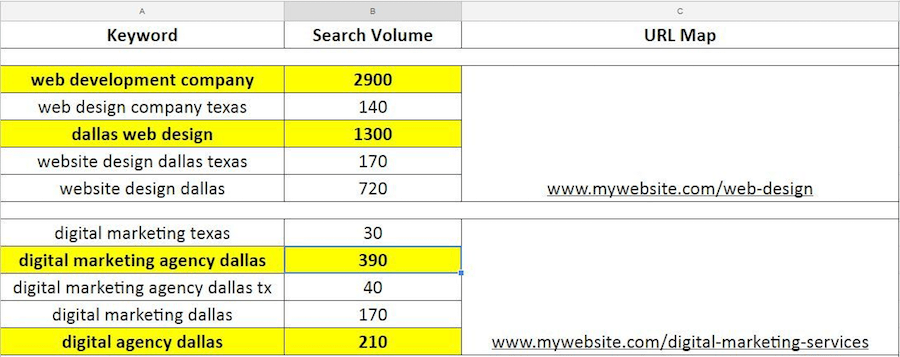
Here’s an example of the bucket list of keywords, and I’ll dive in a bit how we came up with this list:

increase search engine rank

Your most important tools when doing keyword research are Google’s Keyword Planner, KW Finder, and Ahrefs.

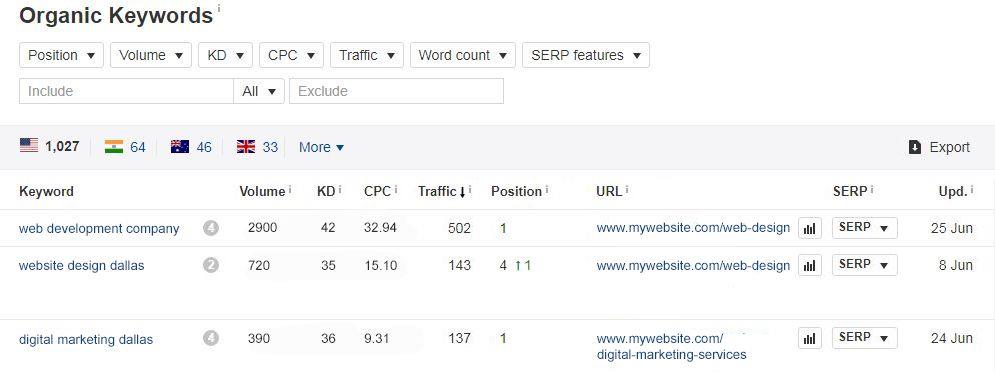
The first thing you need to do is see is determine the top performing pages of the website. Ahrefs provides you a list of your top performing pages, as well as keywords that are ranking for those pages.

21 Tips For Increasing Search Engine Rankings

This is where critical thinking comes into play. Most of the keywords that appear there might not be relevant to the website, so you need to cherry pick the ones that are relevant and have a high search volume. Add these to your bucket of keywords, then highlight the ones that you want to rank for the most.

The next thing you want to do is build your keyword list. That’s where Google Keyword Planner and KW Finder becomes handy tools. The process is the same as how you choose your initial keyword list—go to Google Keyword Planner and plug in your keyword to see other keyword suggestions that you can add to your list.

2. Headlines

One of the struggles in ranking a website is writing a compelling headline – one that has the right keywords and resonates with visitors.

Eight out of 10 people will read a headline, but only two will actually proceed past the headline .

How do you compromise a read-worthy headline and a rank-building headline?

You can go about writing highly-effective headlines in a few ways:

  • Start with a working title: You don’t need to finalize your headline when you start writing. A working title will suffice. This can be as straightforward as possible and include your keywords, so you can determine the best way to present what the page is about.
  • If it sounds off, don’t force it : Keywords are necessary to your headlines to make the page rank higher, but the problem with most keyword insertions is that they appear forced and awkward, sometimes not even making any sense.
  • Optimize for search and social : Straightforward titles work in SEO, but might not always be applicable in social. Your headlines should be playful and attractive, but still having a direct tone that gives users a hint of what the content is about. Find the balance between optimizing for search and social, and sprinkle it with your target keywords.
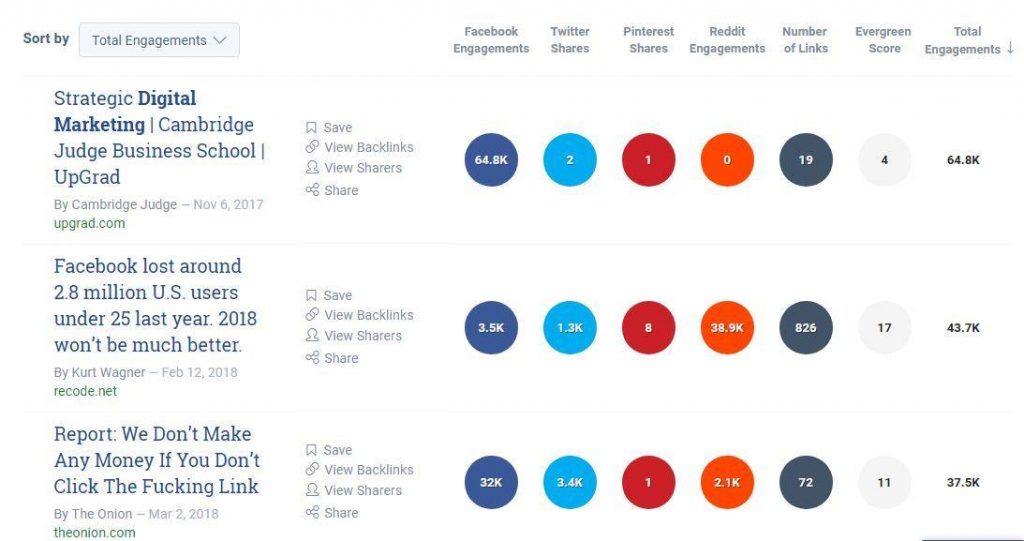
  • See how others are doing it and learn from them : This is why you have tools like Buzzsumo to show you content that has the highest engagement. Look at the top results, analyze how their headlines are written, and see how you can apply to your strategy.

SEO tips

3. Page Content

Websites that rank are those that provide high-quality, relevant content to search users. When we say high-quality content, it should:

  • Be unique – no duplicate anywhere on the site
  • Align with the search intent of the user and provides them with the information they’re looking for
  • Doesn’t have grammatical or spelling mistakes
  • Includes relevant keywords in the title, headers, and body
  • Be accurate and with links to high-authority websites
  • Prompts users to complete a specific action and directs them to the next steps in their customer journey

Is Word Count Important?

Quality or quantity?

That’s always going to be a debate among SEO professionals. Some will say that short is better, as users don’t have the time to scroll a wall of text. Long-form content, on the other hand, provides you with more opportunities to insert target keywords. Ideally, you want a page to have at least 1,000 words of high-quality content.

Writing tips for Bloggers!

4. Post Slug

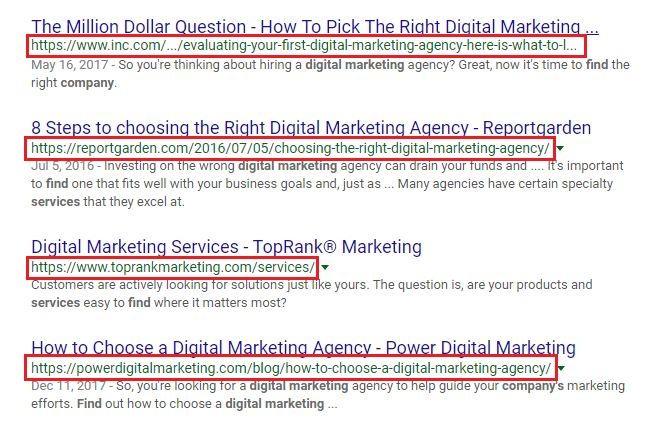
A post slug is the part of the URL that comes after the domain name and shows a particular section of the site. This is one of the things that users see when they do a search.

SEO tips increase search engine rankings

Now, compare these two post slugs:

https://ift.tt/2Lmshxp

https://ift.tt/2L8EOaT

Which of the two do you think is likely going to get more visits?

If you guessed the second one, you’re on the right track!

It’s easy to optimize post slugs, but this is often overlooked by website owners. What they end up with is a jumble of words – or sometimes, numbers and symbols – that don’t make sense and are hard to remember.

Here are a few pointers when optimizing a post slug:

  • Set the right permalink structure : The permalink is the full URL of any page or post of a website. It includes the domain name and the specific page. The permalink structure should match the goals of the site.
  • Keep it short and easy to read : You want a post slug that’s easy to read and remember, but it should still describe what the post is about. Remove stop words and unnecessary articles, such as “the”, “and”, “a”, and “an” as much as possible.
  • Use target keywords : Post slugs that contain target keywords are more likely to rank on search results and bring more qualified traffic to the page.
  • Don’t use the same slug for different pages : The slug should be unique to the page that you want to rank.

IMPORTANT: Think before publishing any page or post because changing it later is not a good practice and will require you to do a redirect. Moreover, the site might lose SEO momentum if you change or remove the permalink of the target page.

5. SEO Image Optimization

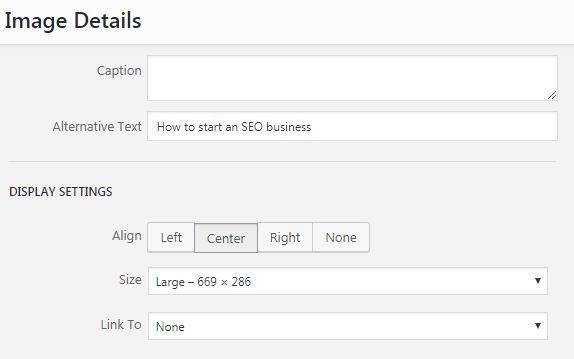
Google doesn’t have the ability to understand what the image is and how it relates to the page, but you can do this by adding alternate text or “ alt” text to images. The alt text provides a short description that appears on the image’s code, so search bots can “see” and “understand” what is being shown.

improve search engine rankings

Another attribute that you have to optimize is the image title. The image title doesn’t appear when the image doesn’t load or appear; it appears when a user hovers over the image.

seo alt tag

This is how the HTML image tag should look like:

<img class=”alignleft size-medium wp-image-1234″ src=”https://ift.tt/2JsAEp5; alt=”alternate text for image” width=”300″ height=”199″ title=”your image title attribute goes here” />

One way to determine if the site has missing alt text is through a tool called Screaming Frog. This can do a quick crawl of the site and generate a file that shows a list of all images on the site. This makes it easier to check which image doesn’t have an alt text and which needs improving.

Pro-tip : When uploading images, rename the image files with relevant keywords or key phrases that you’re targeting.

Apart from using proper image title attributes and alt text, it’s also important to use images that don’t have a heavy file size. Heavy images will make the website load slower and cause users to bounce from the site. Before uploading, compress the image to reduce its file size.

Tools like TinyPNG.com are handy for compressing images.

6. SEO Internal Linking

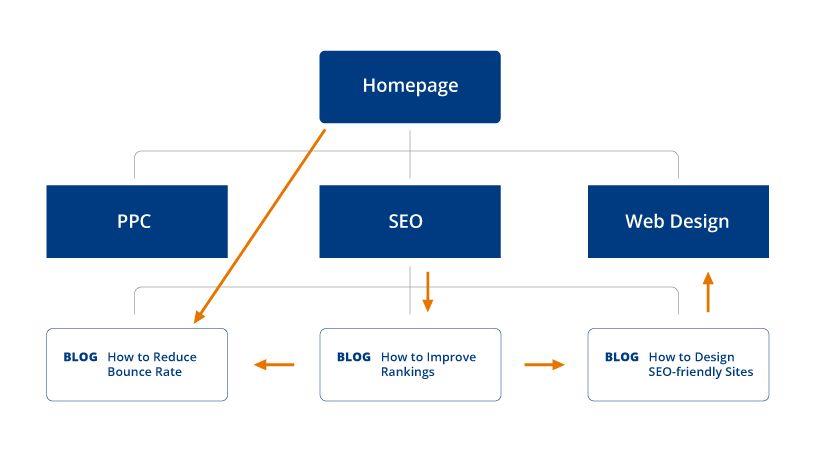
Websites need internal links to help users navigate from one page to another, shows information hierarchy across the site, and, most importantly, spread link equity across the pages. A common oversight that some SEO specialists make is linking haphazardly.

Internal linking is easy as long as you have your keyword research. Your keyword research serves as a guide on which pages you can link to using the appropriate anchor text for a certain keyword. For example, if you want to rank for a certain keyword, make sure it’s getting as much link juice as possible from relevant pages or blogs on the website. From this, you can create an internal link map for the website.

You can structure your internal link mapping like this:

SEO and Internal Linking

7. External linking

Adding external links provides your visitors with another point of reference when they need to verify information on your website. There are two ways to go about external linking: one is having another domain point a link to your website (inbound) , and the other is to link from your website to another domain (outbound).
Dofollow or No-follow?

When do you link with a dofollow or no-follow?

You opt for a dofollow link if you want search engines to drive link juice to your website from an external source with a high domain authority. No-follow, on the other hand, is you telling search engines not to follow a website linking to you, or basically putting up a sign that says, “Don’t count this link.”

8. SEO and Broken links

Broken links happen if a page has been removed or its URL has been changed without a redirect added. When someone clicks on a broken link, a 404 page will appear to show the page they’re looking for is not available on the website.

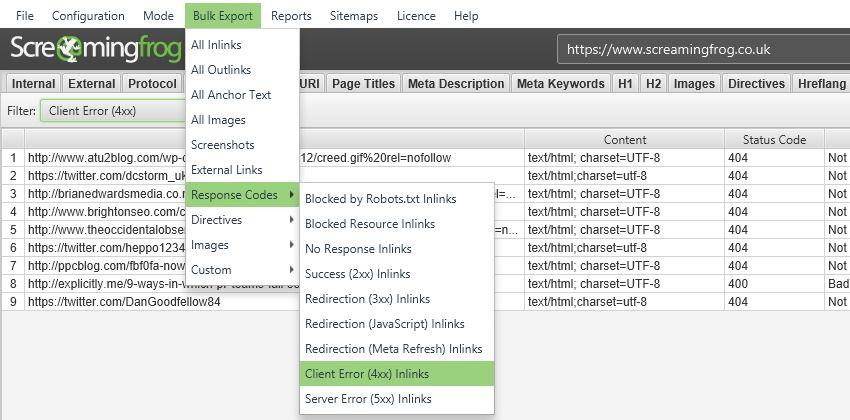
Why are broken links bad? For one, these disrupt the user experience and cause the site’s bounce rate to skyrocket. Users who can’t find the information they need tend to leave the website. Another reason is too many broken links can hurt SEO rankings, as search engines may devalue a website that has broken links.

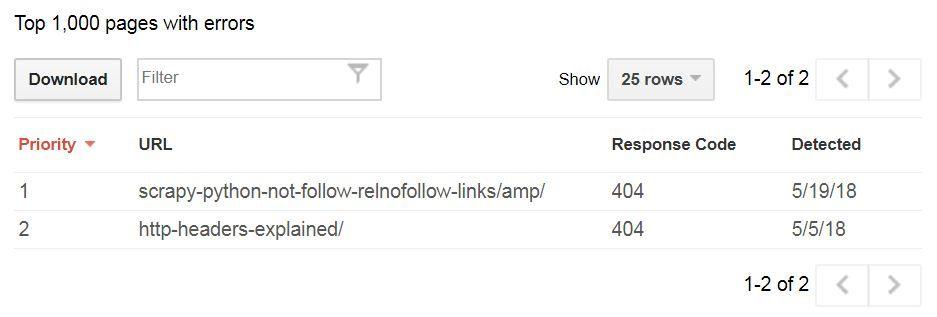
Use Screaming Frog or Search Console to identify broken links. Here’s how Screaming Frog shows broken links on the site:

SEO and broken links

Google Search Console also provides you with Crawl Errors on the website.

Search Console

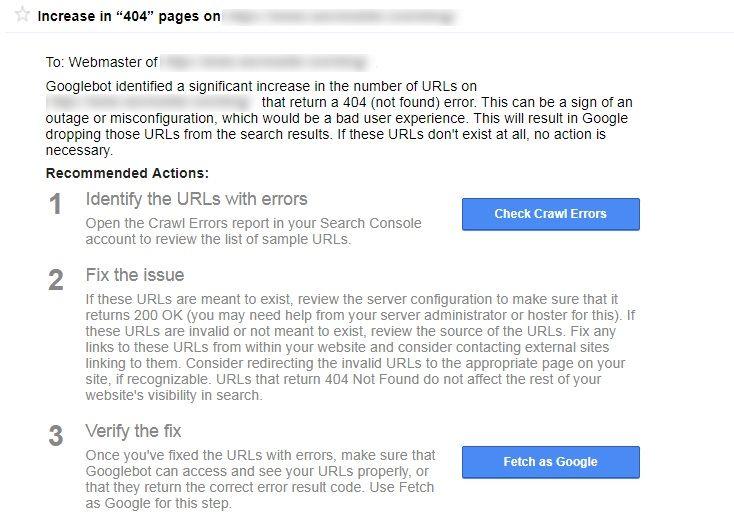
You’ll also receive a notification on your Search Console dashboard if there’s an increase of 404s on the website.

Console dashboard and seo

How to Fix Broken Links

  • Make sure the URL is formatted correctly.
  • Add a redirect to old, broken links and direct them to relevant pages on the site.
  • Remove the anchor text directing to a broken link if the page no longer exists.

9. Sitemap

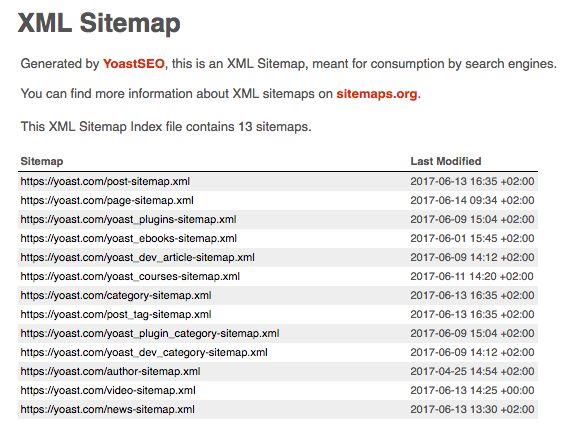
Search bots read the XML sitemap to get information about a website. The sitemap is like the blueprint of the website—it includes information on the architecture of the site, valuable metadata of the pages listed in the sitemap, and specific types of content on the pages of the website.

When you submit an XML sitemap, you’re giving Google the go signal to count the pages included in the sitemap to be of high-quality and worthy of indexing.

For the majority of us using WordPress, there are plenty of tools and plugins online such as Yoast SEO and All-In-One SEO Pack which automatically submit your sitemap from your website to Google when new pages are created. This is considered best practice — submitting an updated sitemap each time you create a new page. [Automating this process is just the icing on the cake.]

Sitemap and increasing search engine position

It’s still critical to look through Google Search Console to make sure you don’t have crawl errors, or pages that shouldn’t be on your sitemap, being in the habit of reviewing your sitemap at least once a month is good practice.

10. Backlinks

Yes, link building is not dead. In fact, a website can’t thrive without links supporting it. Like what I mentioned before, links serve as a point of reference – not just for users, but also for search engines. This is why you need to get high quality backlinks from high authority sites.

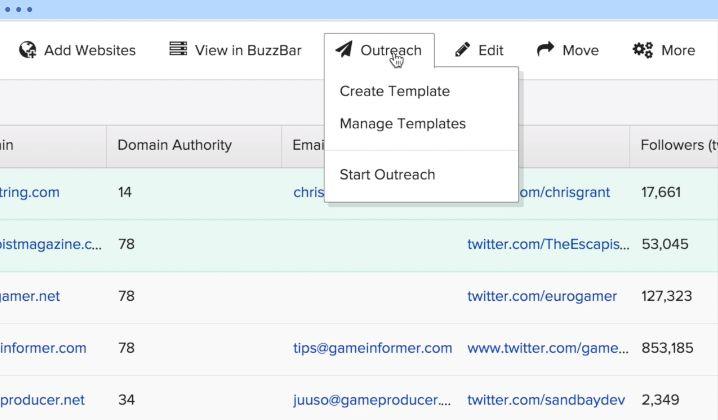
Guest posting to other websites is one way to get backlinks to your site. Be sure to submit guest posts to sites with a high domain authority. I use Buzzstream to look for potential guest posting websites with high DA scores.

SEO tips

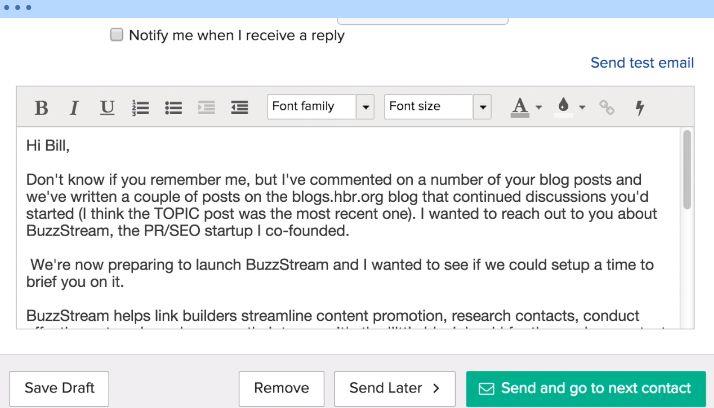
After listing down potential guest posting sites, reach out and pitch with the topics you want to write about. Here’s an example of an guest post outreach email from Buzzstream:

SEO tips backlinks

Another effective strategy to build backlinks is creating local citations or listings. I recommend this for websites that are targeting a specific location. If there’s a piece of content you want to promote, social bookmarking and forums are effective channels to utilize that content for building links.

Link Building – Without The SERP Risks

11. Meta Data

Meta Data is composed of two parts – title and description. Some SEO professionals add Meta keywords in their Meta Data, but Google says it doesn’t consider these in ranking search results.

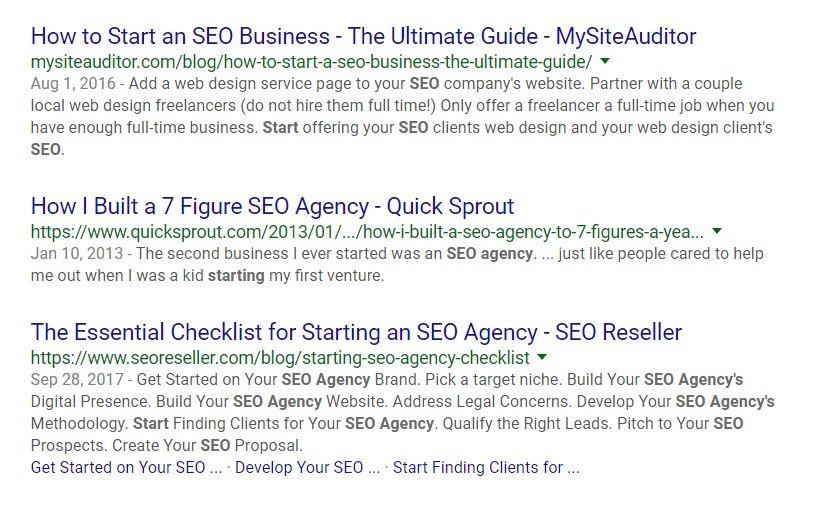
A website’s Meta Data should entice users to click and provide them with information about the page. The Meta Data appears as a snippet of text on search results and on the HTML code of the website.

SEO tips

See how the Meta title and description are written for the results on the top positions. These show snippets that match the intent of the user and provide enough information on what the page is about.

Here are a few best practices to follow when optimizing the Meta Data of a website:

  • Use your target keywords in your Meta Data—ideally, the keywords should be on the left-most side.
  • Don’t write descriptions and titles that are too long, as this will cause the Meta Data to appear truncated.
  • Each title and description should be unique to the page.
  • Write compelling copies for the title and description to maximize click-through. The title and description should provide information that matches the search queries of users.

12. Tags

Optimizing tags is one way of improving how a website communicates with search engines. These tags are not visible to users, but they are to search engines. When search engines crawl a site and find these tags, they get information on what the website is about.

Here are some important tags you need to optimize:

Title tag : Each page should have a unique title tag, with only 50-60 characters (keywords included). What you put in the title tag is what will appear on search results. While it’s important to put in keywords, it’s better to make the title tag appear natural.

Header tags : Depending on how you structure your page, you can have H1, H2, H3, H4 tags, and so on. The idea about using header tags is to organize the content of the page. H1 tags usually serve as the title of the body content, while the subsequent header tags are the subheadings. Use your main keywords on H1 tag and embellish the subsequent tags with secondary keywords.

Schema tags : Optimizing the site’s schema tags improves a search engine’s ability to understand what the website is about and improves how the website is displayed on search results.

Nofollow link tags : Nofollow tags are important if you have backlinks that you don’t want search engines to count. Use this tag if you have links going to websites with a low domain authority.

Anchor text tags : When linking, pay attention to the anchor text. Your anchor text should provide context to where you’re linking; otherwise, search engines won’t see the connection and relevance of the link.

Canonical tags : These are used if the website has duplicate pages. You add this tag to help search engines identify which URL to consider as the master page among the duplicates.

Do a deep dive of the website to ensure its tags are optimized appropriately. Use Yoast for an way of adding tags on the website.

13. Page Speed

Here’s the deal with search—the longer it takes for a website to load, the more likely users will abandon the site. According to John Mueller in 2016, the ideal page speed is below three seconds, to cater to both search engines and user experience.

So, how do you improve a website’s page speed?

First things first, do a quick sweep of the website. Are there too many images on the site? Does it use Flash content? Which plugins are available?

Let’s start with images. Experts say images make up more than half of a website’s weight. For better optimization, use images in JPEG or PNG format. Make it also a habit to compress images before uploading.

Minification of JavaScript, HTML, and CSS is also an important practice to reduce the client-server requests in loading website content. You have to be careful during the minification process, so only the unnecessary codes are removed.

Reduce the number of plugins on the website. If the plugin requires complex operations, requires the use of external APIs, and loads many content assets or scripts, consider removing this from the site.

Also – see our previous article on Page Speed.

14. Mobile Optimization

With Google’s mobile-first indexing, neglecting mobile optimization is out of the question. If the site is already mobile optimized, good job! If not, you’ll have to start working on keeping it on par with sites that are mobile optimized.

Here are a few tips to optimize the site for mobile:

  • Minimize intrusive ads that hinder the experience of mobile users. If you want to have ads, it’s best to keep them at the bottom of the page.
  • Make sure pop-up software is Mobile Friendly.  No Flash.
  • Code instead of using images, as this helps in improving page speed.
  • Your content should be direct to the point but catchy and memorable.
  • The site should be responsive to all types of screens and orientations.
  • Text should be clear and legible—you don’t want users to zoom in on the page when they’re browsing.

15. HTTPS

Users are becoming savvier with how they browse and share information. With privacy becoming a main concern of many online users, maintaining a secure site is key.It’s important to check if the site has a security certification. If there’s none, you have to get this certificate from a certificate authority, which will verify the ownership of the web address.

There are three types of SSL certificates:

  • Domain Validation SSL Certificate : This certificate entails the website has been registered by a person with admin access.
  • Organization Validation SSL Certificate : This certificate validates the ownership of the domain and provides information, such as the website owner’s name, city, state, and country. This is usually used for commercial websites.
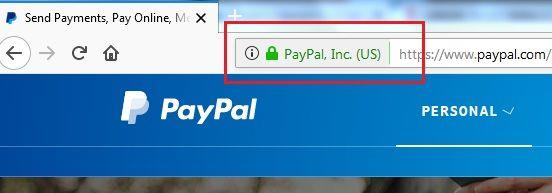
  • Extended Validation SSL Certificate : This certificate displays the verified owner of the website on browser address bars. This is ideal for high profile websites that are prone to phishing attacks and handle online financial transactions, such as banks.

SEO tips

Make sure your HTTPS site isn’t blocked from crawlers in your robots.txt files. Avoid using the noindex meta tag to ensure search engines are able to index your pages.

16. Duplicate Content

Duplicate content has always been a thorn on the side of digital marketers and website owners. But why do you need to be mindful of duplicate content? For one, search engines will have trouble distinguishing which version to include or exclude in their indexing. This, in turn, makes it difficult to determine which version to rank on search results. Second, duplicate content confuses users, which hinders their search experience. Most importantly, link equity becomes diluted among all duplicates, which impact the visibility of the original version.

How to Fix Duplicate Content:

  • Set up a 301 redirect.
  • Use the rel=”canonical” tag to specify which URL serves as a copy of the original.
  • Don’t use the same content over and over across your pages – even in your Meta Data.
  • If you have pages with similar content, expand the content of each page, or consolidate the information into one page.

17. Pagination

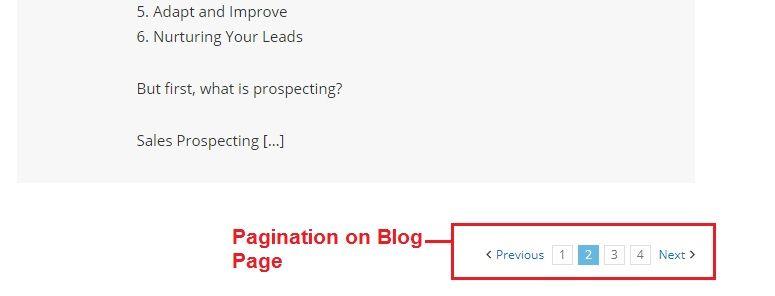
The more structure a website, the easier it is for users to navigate and get the information they need. If done right, pagination can bring about an amazing experience for users. This is why most websites implement pagination to provide users with additional navigation when browsing single sections of a page with long-form content.

increasing search engine rankings

When doing pagination, one of the important elements is a visible navigation. Placement is key when it comes to this aspect—do you only add pagination at top or the bottom of the page? If the pages are long and require continuous scrolling, it’s best to add pagination at the top and bottom.

As the purpose of pagination is to make it easier for users to navigate the site, it needs to show where they are and where they can go next. Users should easily identify the current page, so they know of where they are on the site. This also includes adding the Previous and Next links separated from the page numbers.

Another good practice for pagination is adding a “Go to Page” option. This enables users to jump to their desired page number instead of clicking on the Next link or the preceding or succeeding page numbers.

Finally, the first and last page numbers should be visible…

This gives users an idea of how much information they can get from the site. This also allows them to jump to the first and last pages without clicking through the other pages.

Pagination: 7 Best Practices with Examples

18. SEO and Reducing Bounce Rate

A website with a bounce rate going through the roof is never good news. A high bounce rate can be a source of why a site isn’t ranking on search results. When the number of users bouncing from the site is high, Google discredits the website and delegates a low score that affects rankings.

So, how do you reduce a website’s bounce rate?

  • Increased page speed : Use Google’s Test My Site to do a quick mobile speed test and see which areas on the site need improving.
  • Improved readability : This means no walls of text and better content formatting. Use subheadings or bullet points to make content scannable and digestible. Add imagery and screenshots that support information on the page.
  • Compelling Call to Action : Be clear on what you want users to do on the site – whether to buy, subscribe, or contact the business. Entice users to click on the CTA by giving a sense of urgency or showing the value of the service.
  • Fresh content : Always provide fresh content on the website. By publishing high-quality, high-value content, you’re providing momentum for the website and keeping users updated with new information.Understanding what is an ideal bounce rate is the first step into identifying how to reduce users leaving your site, and keeping visitors on your site, engaged and ready to take action.

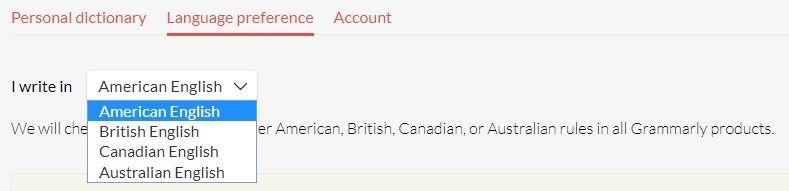
19. Language Appropriation

English may be the universal language, but it’s not as universal as you think. There’s a difference between the American and British English in terms of spelling, word usage, and expressions.Why is it important to focus on language appropriation in SEO? Simple—you want users to be able to relate to the website. Using the appropriate language is the first step.One of the tools I recommend using is Grammarly. This checks for grammatical and spelling errors, proper punctuation, word choice, and style when writing. Grammarly also allows you to choose your language preference – American English, British English, Canadian English, and Australian English.

Language Appropriation

20. HTML5 Sections

I’ve discussed a couple of HTML tags that you need to optimize at tip #12 of this post. On this section, I’m going to dive deeper into HTML5 sections that you need to pay attention to. The latest version of HTML has semantic elements that you can optimize to provide search engines more context on what a page is about.

I’ll be focusing on the following:

  • <article> : This tag is used to specify new blog entries in a page. You can use this for content that changes from time to time, such as blog posts, forum posts, comments, or news stories. With this tag, you’re signalling to search engines to focus on the text inside the article more than the other elements of the site.
  • <aside> : This tag focuses on secondary content of the page. This tells search engine that the content with this tag is important, but not as much as the other content on the page. For instance, when you use this tag inside the <article> tag, search engines will see it and note its relevance to the article, but will not focus much on it. When using this tag, the aside content should have contextual relevance to the surrounding content. <nav> : This tag tells search engines that all the links enclosed in the tag are important for moving around on the website, which is why you should use this for major navigation links.
  • <section> : This tag allows you to break down content into different sections to make it easier for users to scan and find the information they need. Each section tag should contain a header tag to help search engines identify what that specific section is about and understand how it relates to the other content on the page.
  • <footer> : This tag specifies content that is placed at the bottom or footer section of a website. It contains copyright information, contact information, authorship information, sitemap, and links to other related pages. It also tells search engines the content enclosed in the tag is not as important as the content on the top section of the page.

By using the appropriate HTML5 sections, you’re hitting two birds with one stone—that is, making it easier for search engines to sort through the content of the website and providing users with a smooth user experience.

21. Displaying Updated Content

Fresh content is one of the foundations of Increasing Search Engine Rankings, but what about existing content on the site?

Do you leave those out of your strategy?

The answer is no.

While it’s important to provide as many pieces of fresh, relevant content as possible, you can still fuel existing content on the site to improve rankings. One way is by updating the cornerstone pieces and those that generate a lot of traffic. This shows the site has new information to offer and that you’re maintaining the website regularly.

There are different ways to display updated content on the website.

Option 1: Displaying the Last Modified/Updated Date Before the Post Content

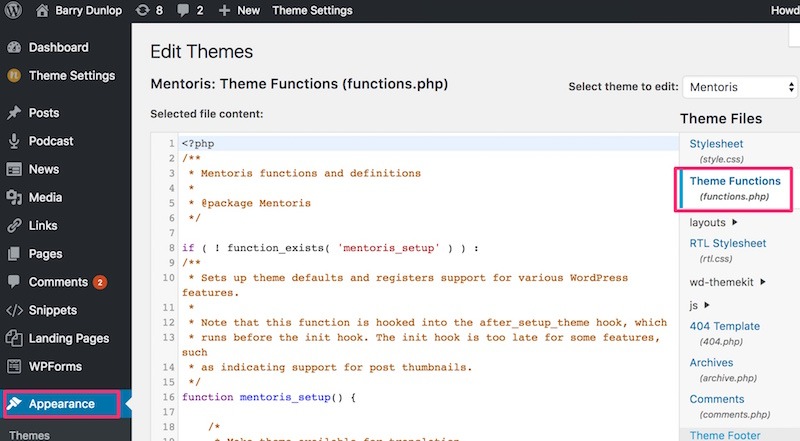
This is done via functions.php (which is found via Appearance | Editor in your WP Dashboard)
theme functions php


Then add the following code to the functions.php of the site to show the date you last updated a blog post:

function wpb_last_updated_date( $content ) {
$u_time = get_the_time(‘U’);
$u_modified_time = get_the_modified_time(‘U’);
if ($u_modified_time >= $u_time + 86400) {
$updated_date = get_the_modified_time(‘F jS, Y’);
$updated_time = get_the_modified_time(‘h:i a’);
$custom_content .= ‘<p class=”last-updated”>Last updated on ‘. $updated_date . ‘ at ‘. $updated_time .'</p>’;

}

$custom_content .= $content;

return $custom_content; }

add_filter( ‘the_content’, ‘wpb_last_updated_date’ );

This is how it will appear on the website:

SEO tips

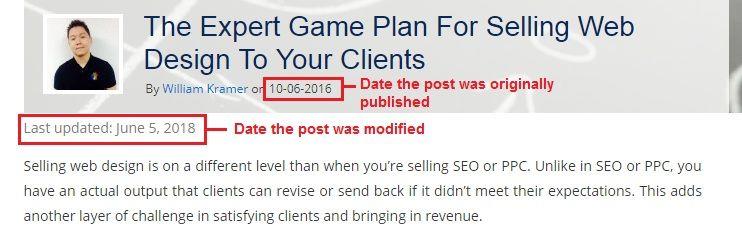
Option 2: Displaying the Last Modified/Updated and the Original Publication Date

If you want to show the date you last updated the post with the original publication date, add the following code:

$custom_content .= $content;

$u_time = get_the_time(‘U’);
$u_modified_time = get_the_modified_time(‘U’); if ($u_modified_time >= $u_time + 86400) { echo “<p>Last modified on “; the_modified_time(‘F jS, Y’);
echo ” at “;
the_modified_time();
echo “</p> “; }

After adding the code, you’ll get something like this:

SEO TIPS FOR BLOGGERS


Option 3: Adding a Plugin to Display Modified Date

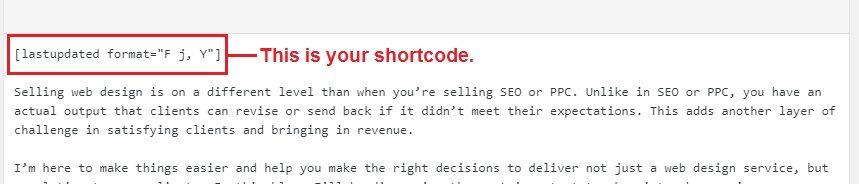
If you’re not one for coding, you can use the Last Modified Timestamp plugin on WordPress. This plugin allows you to generate a short-code that you can add to a post, but that’s the downside—you have to add this to every page you want to update.

Last Modified Timestamp plugin

When you’ve successfully installed the plugin, this is how it will look like on the page:

SEO TIPS that work

Now that you know…

Increasing Search Engine Rankings is not rocket science, but it’s not as easy as ABC either.

What I learned in my years of working with agencies, providing wholesale SEO and building websites is you need to experiment with different strategies. While there’s no set formula on how to increase Search Engine Rankings, the best practices above are a good place to start!

The post 21 Tips For Increasing Search Engine Rankings Right Now appeared first on How To Make Money Online.


from 21 Tips For Increasing Search Engine Rankings Right Now

Friday, July 13, 2018

#1623 iFart creator Joel Comm tells me I need to chill out and have more fun

Today’s guest created an app that got my attention years ago. It was called iFart. I’m not really into fart humor but the reason I downloaded it is because everyone else was freaking downloading it and I wanted to see what it was. I tried it a couple of times and it felt inauthentic to me but I admired how this little app got to the top of the charts. I took a look at the founder and his name was Joel Comm and this wasn’t his first success. He’s a guy who had an online game site that he sold to Yahoo. He then went on to build a bunch of different things. He was in affiliate marketing. He was in AdSense. He actually wrote a book on AdSense that was incredibly successful.

Joel Comm is the Founder and CEO of InfoMedia, a social media consulting company.

Sponsored by

Toptal – If you’re having trouble finding developers, Toptal is a network of elite pre-vetted software developers. You tell Toptal what you’re looking for, they search their network for the best people, they test the candidates, and then they present you with only the candidates who meet your individual needs. Once you pick someone you can start work with them the next day. They offer a no-risk trial period. Go to Toptal.com. Get the best of the best right now.


HostGator – Ready to take your website to the next level? Whether you’re a first-time blogger or an experienced web pro, HostGator has all the tools you need to create a great-looking website or online store. A wide range of options includes cloud-based web hosting, reseller hosting, VPS hosting and dedicated servers. Founded in 2002, HostGator is the perfect web partner for business owners and individuals seeking hands-on support. Visit https://ift.tt/2HikPBw to see what HostGator can do for your website.

More interviews -> https://mixergy.com/moreint
Rate this interview -> https://mixergy.com/rateint


from #1623 iFart creator Joel Comm tells me I need to chill out and have more fun