Technical SEO.
If you’re like most marketers I know, that phrase can give you the heebie-jeebies.
It just sounds so…
Well…
Technical.
And chances are you’re not a developer or a master programmer. So you shouldn’t have to worry about technical SEO… right?
Wrong. Totally wrong.
Without proper technical SEO, you’ll never rank for your target keywords.
As you’re about to learn, technical SEO is crucial if you want to rank for your most important keywords. Without good technical SEO, you could end up with the visibility of a short kid standing in the back row of a team picture.
But don’t worry. There’s good news: once you start digging in, technical SEO is not nearly as hard or complicated as it sounds. In most cases, it’s a fairly straightforward task that you can get the hang of relatively quickly, and you won’t even have to go back to DeVry for a second degree to do it.
And here’s even more good news:
In this post I’m going to help you fast-track your results by sharing the 8 most common technical SEO mistakes most marketers are making, and how to fix them.
Now you may be wondering, what is technical SEO anyway? And why is it so important?
I’m glad you asked.
What is Technical SEO Anyway? And Why is it So Important?
In general, there are 3 main kinds of SEO: technical SEO, on-page SEO, and off-page SEO.
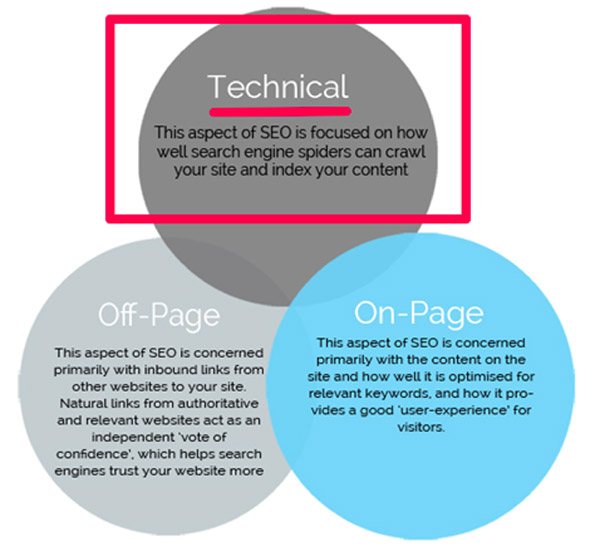
Here are some quick and dirty definitions:
On-Page SEO: In a nutshell, this is your content. To rank for competitive terms, you need to create engaging content that includes the right keywords.
Off-Page SEO: This is your inbound links. To rank for competitive terms, you need inbound links from authoritative and relevant websites.
Technical SEO: This is making sure that Google and other search engines are able to crawl and index your content.
Most people tend to focus on the off-page and on-page SEO. And those are really important!
(RELATED: 5 On-Page SEO Elements (+1 Bonus Tactic) to Optimize in WordPress)
But here’s the thing:
Without proper technical SEO, you’ll never rank for your target keywords—no matter how good your content is or how many great links you have.
Let’s explain this with a quick analogy. Pretend, for example, that you’ve just produced your own feature film (go you!) and you’re releasing your new movie in theaters. And now, you want to get as many people to come see your movie as possible.
In this scenario…
- Your on-page SEO is the movie itself. (The content needs to be good.)
- Your off-page SEO is all your reviews. (You need other people to confirm how good your movie is.)
- And your technical SEO is like having a movie projector that actually works.
See what I mean?
It doesn’t matter how good the movie is or how good your reviews are. If you have a technical problem—like a broken movie projector—then nobody’s going to see that movie. It just won’t be possible.
Technical SEO is the same way.
And technical SEO mistakes are a lot more common than you might realize. In fact, we had one just recently here at DigitalMarketer!
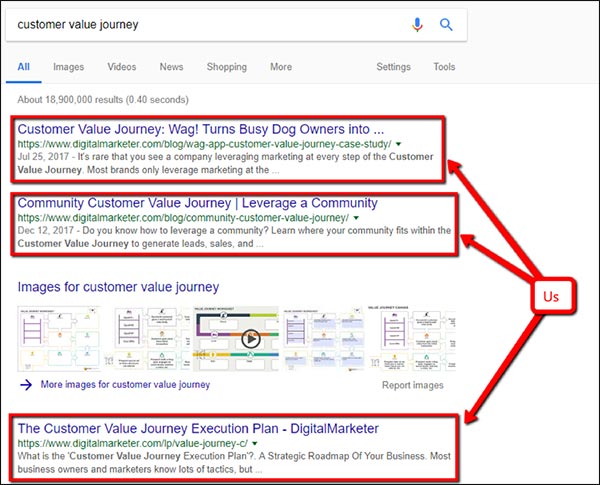
During my very first week here, Marcus (our Director of Monetization) came to my desk and said that he’d really like to rank for the term “customer value journey.”
I started doing some digging and was perplexed. We had 3 really great pages that should have been ranking for this keyword. And on top of that, we’re an authoritative site for digital marketing-related terms.
So why weren’t we ranking for “customer value journey”?
It turns out we had a technical SEO mistake: there was a folder in the URL structure that had been noindexed, nofollowed across the entire site. As a result, none of our customer value journey pages could be seen in the search results!
So I removed those tags, and in the very next week we were ranking for “customer value journey”… not once, not twice, but 3 times:
To go back to our analogy, we had a great movie… with great reviews…
But the projector was broken.
Fortunately, the solution is pretty simple. Fix the technical problem, and you can start ranking really fast if your on-page and off-page factors are in place.
So now I’m going to give an overview of the 8 most common technical SEO mistakes that people make, and how to fix them. Starting with…
Mistake #1: Confusing Your Meta Descriptions + Title Tags with Your Open Graph Description + Title
Your title tag is a little bit of text that can appear in the search results and in the tab of your website. And your meta description is what appears as the description of your page in the search results.
It’s probably easiest to just show you what I mean:
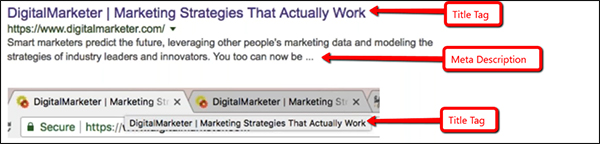
People usually think of meta descriptions and title tags as on-page SEO elements. But as you’ll see, they can also be considered technical tags on the back end of your website.
For example, here’s the title tag on our homepage:

Pretty simple. But 1 mistake that a lot of people make is confusing their meta title/description with their Open Graph title/description.
Here’s the Open Graph title (the highlighted part):
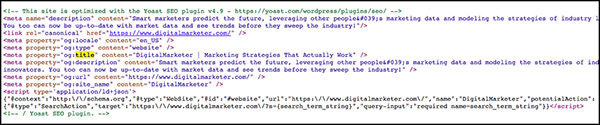
And here I’ll highlight both the meta description and the Open Graph description. As you can see, they look very similar so it’s very easy to confuse them:
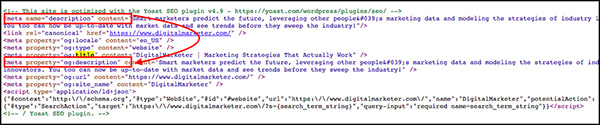
This is an easy mistake to make, but fortunately, it’s also really easy to fix. Just make sure you have both a meta description/title tag and an Open Graph description/title tag.
Here’s how you can tell which is which:
- Title tag begins with: <title>
- Open Graph title begins with: <mega property=“og:title”…
- Meta description begins with: <meta name=“description”…
- Open Graph description begins with: <meta property=“og:description”…
Mistake #2: Not Using Open Graph to Optimize Your Social Links
We just talked a little bit about Open Graph in technical SEO mistake #1. So, what is Open Graph, anyway?
Basically, Open Graph is sort of like a title tag and meta description for social networks. It’s what tells sites like Facebook what your page is about, and how to display your page anytime it’s shared on that network. It can include a title, description, image, and more. Here’s an example:
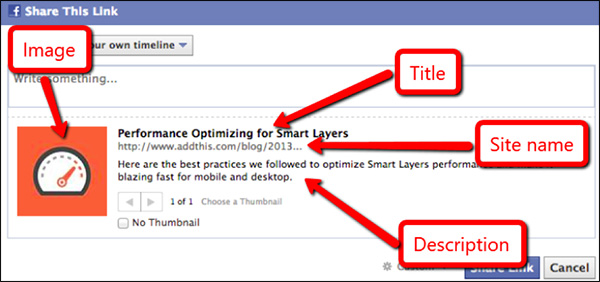
Looks nicer than just a plain old link, doesn’t it?
Here’s what Open Graph tags look like on the back end:

And here are some of the different Open Graph tags you can specify:
- og:title – This is the title of your object as it should appear.
- og:type – This is the type of your object, like “video.movie.” Some types may require additional properties.
- og:description – This is the description of what your page is about.
- og:image – This is the URL of an image that should represent your object.
- og:url – This is the canonical URL for the page.
So make sure to specify these tags for any page that gets social traffic. Your links will look more appealing with a nice image and a well-written title and description, which will help improve your click-through rate—and therefore your reach—on social media.
(NOTE: Before you get started fine-tuning to rank for your keywords, you need to know who your ideal customer is, where they are, and what they want to see. Download our FREE and proven Customer Avatar Worksheet and get clear on who you’re selling to.)

Mistake #3: A URL Structure That Creates Duplicate Content
Now let’s talk about your URLs. You may already know that this is another factor that can influence your SEO. Having your primary keyword in the URL, for example, can help improve your rankings. It’s also considered a best practice to keep your URLs relatively short so that people can see what they’re about to get when they click on your link.
Here’s an example of one of our URLs that does both, which helps it to rank for the term “Facebook Messenger marketing”:
https://www.digitalmarketer.com/blog/leverage-facebook-messenger-marketing/
But inherent in your URL structure is a potential technical SEO mistake that you want to be on the lookout for:
Having your primary keyword in the URL can help improve your rankings.
Accidentally creating duplicate content.
This happens a lot more often than most people realize. One common way it can happen, for example, is when you upgrade your hosting from http to the more secure https. When you do that, you have to make sure that the non-secure (http) pages are all properly redirected to the secure (https) pages.
Otherwise, you could potentially be creating a ton of duplicate content without even realizing it.
Here’s a quick and easy way to figure out if you’re making this mistake right now:
Go to your search bar and navigate to your website. Say it’s https://www.mycoolsite.com. Now try deleting the “s” from your website so that the address is now http://www.mycoolsite.com, and hit enter.
If your site automatically redirects you back to the https version of the page, then you’re good.
But if the non-secure (http) version of the page loads, then that’s a problem. Because that means as far as search engines are concerned, there are 2 versions of your page—the http version and the https version.
If that’s the case, then you’ll need to let your developers know so they can set up 301 redirects. That way Google and other search engines are seeing only 1 version of every page on your site.
The same principle applies to any potential URL differences, including:
Remember, every page on your site should have only 1 URL. Otherwise, you’ll be creating duplicate content.
Now, duplicate content isn’t the end of the world. It’s not a penalty in Google. But it’s not ideal, because when you have multiple pages with the exact same content, then Google (not you) decides which link to display in the search results.
And you never want to let Google decide. You always want to keep control over this stuff for yourself.
If you don’t, Google could potentially do something like rank a page with UTM parameters, which means that instead of ranking this URL in the organic results:
https://www.digitalmarketer.com/resources/blog-marketing-strategies/
It could rank this page instead:
https://www.digitalmarketer.com/resources/blog-marketing-strategies/?utm_source=newsletter&utm_medium=email&utm_campaign=spring_sale&utm_content=ad_3
And you definitely don’t want that! For one thing, it’s long and hard to read. Second of all, you’ll have 2 urls in your analytics, which can cause issues in your data. You’ll have to combine these together.
That’s a lot of potential complications that can arise based on your URLs. Fortunately, the solutions are pretty simple—phew! You just need to do these 2 things:
1) Always specify a canonical URL (this tells Google which URL to rank)
On the back end, make sure that your canonical tags exactly match the URLs that you want ranking in search engines (including https, www, trailing slash, everything). Here’s what a canonical tag looks like on the back end:

2) Use 301 redirects whenever necessary to redirect to your desired URL
If you find that multiple versions of a page are loading, just redirect all the duplicates to your canonical URL. You can learn how to do that here if you are new to redirects.
And if you want to figure out whether a page is being properly redirected or not, check out the Redirect Path Chrome extension. It will show you the redirection path of every URL so you can double-check this stuff.
Mistake #4: Improperly Specifying Language Parameters
If your website is translated into different languages, you’ll want to use the hreflang tag to specify a URL for each translated version of each page.
Here’s what that would look like if our homepage were translated into Chinese, French, German, Japanese, Portuguese, and Spanish:
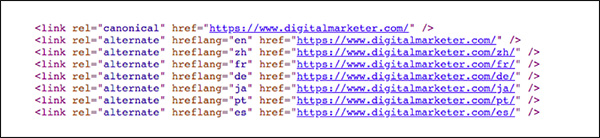
This tells Google that these URLs are translated versions of the same page. So if someone is searching for your page in Spain, Google will automatically show the Spanish version of the page. If the searcher is in Japan, it will show the Japanese version. And so on.
Basically, language parameters allow you to show the right page, in the right language, to the right people.
(Warning: you should ONLY do this if your page is actually translated into each of the languages you specify.)
Mistake #5: Using Header Tags for Formatting (And Not SEO)
Header tags tell a search engine what to focus on when they’re crawling a page on your website. So, when you’re coding your page, you want to make sure to include your target keywords in those header tags so that Google will know what your page is about and rank it accordingly (if you can’t find a way to weave it in, you might want to rethink your keyword choice)
But here’s the problem that comes up a lot:
Header tags are often used for formatting and design, rather than for SEO. (This is especially true on WordPress sites.)
Sometimes if you want some text to look bigger, it’s easier to give it an <h2> and move on than it is to style it accordingly with CSS. But that’s not the best practice. Ideally, you’ll reserve those header tags for phrases that contain your target keywords.
Now I’ll be the first to admit that it’s not always easy to follow this advice… Here’s an example of a place on our homepage where we’re using an <h2> tag to style a bit of text that really shouldn’t be in a header tag:

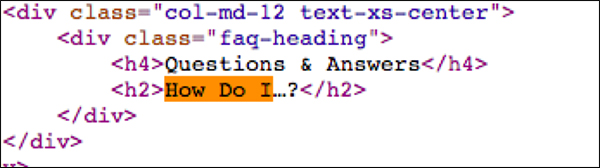
By putting the text “How Do I…?” in an <h2> tag, we’re essentially telling Google that “How Do I…?” is an important keyword to look for when crawling this page—which, of course, it isn’t.
Now, this isn’t a huge issue. It’s not going to destroy your organic rankings if you have header tags with irrelevant keywords inside them. But again, it’s not the best practice. So try to reserve those header tags for keyword-rich phrases (especially if you’re trying to rank for a really competitive keyword).
Mistake #6: Using Keyword Tags
This one is going to be really short and sweet:
You know that keyword tag that tells Google which keywords you’re targeting for each page?
Don’t use it. Seriously.
If you have a bit of code like this on your site:

Then just delete it and move on.
Here’s why. This bit of code was originally used to remind SEOs which keywords they were trying to rank for. And it was considered a ranking factor in Google.
But these days, it’s definitely NOT a ranking factor. It doesn’t help your rankings at all. And it’s also NOT a good way to keep track of the keywords you’re targeting on each page.
(For that, you should be using an SEO tool or even just a spreadsheet. You can learn more about SEO organization here.)
So the keyword tag has zero benefits. The only thing it does is inform your competitors of which keywords you’re targeting!
And you don’t want to give your competitors that kind of advantage. So do yourself a favor and don’t use the keyword tag.
Mistake #7: Using Pagination Incorrectly
Pagination is when you use multiple pages of content. You’ve almost certainly seen paginated content with a navigation bar that looks something like this:

You may want to use pagination on your blog, for example, or on an ecommerce store with lots of products.
Now the technical SEO implications of pagination can get tricky because you can potentially create duplicate content between the separate paginated and the view-all versions of your content.
There are 3 potential ways to handle pagination for SEO:
Option #1: Use a canonical tag to point to a view-all version of a page.
With this solution, you’re creating a single page that will display all your results. So the user won’t have to click “Next” or “Previous” to find what they’re looking for (a specific blog post, product link, etc.).
Instead, all those results will be on 1 long page. To do it, you’ll need to manually point all your separate pages to the view-all version… like this:
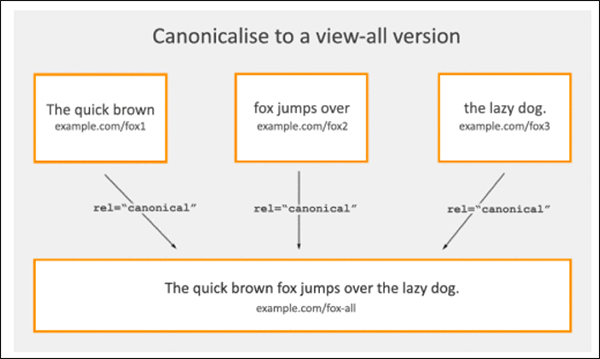
The benefit of this approach is that it’s fairly simple and straightforward to create, and it solves the issue of duplicate content by putting all your results on one big page.
The problem is that because that page will have so many results, it can lead to slow load times and potentially a poor user experience (it may be hard for the user to find what they’re looking for).
Option #2: Paginate using HTML markup.
The other option (and the one we use here at DigitalMarketer) is to break up your results into separate pages so that each page contains a more manageable number of results. This way, the user can click “Previous” or “Next” to navigate among the results. Like this:
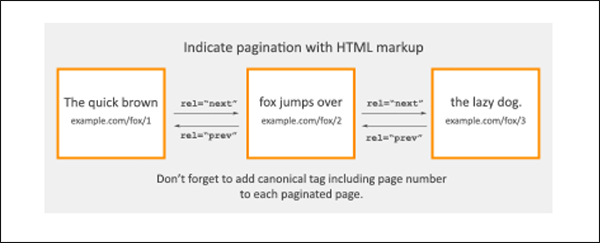
You can implement this solution using the rel=“prev” and rel=“next” tags so that on each page the user can navigate forward or backward in the series.
If you decide to go this route, just make sure there isn’t a rel=“prev” on the first page or a rel=“next” on the last page of results. Otherwise, you could potentially be creating duplicate pages.
Option #3: Don’t do anything and let Google try to figure it out.
This is the option I like to call…

If you don’t feel strongly about how your content is paginated in the search results, then you could do nothing and let Google decide how to show your results.
Google understands that this sort of thing happens, so if you don’t specify a pagination system then Google will try to group your pages even if there’s no pagination markup.
At the end of the day, it’s probably not the most optimized option out there because it means you have no control over how Google presents your pages. But it’s still an option if your time is limited and you have more important things to focus on.
Mistake #8: Accidentally Applying Noindex, Nofollow to a Page You Actually Want to Rank
A noindex, nofollow tag on the back end of your site tells crawlers like Google not to crawl a page and not to index it. So, if you have a page that you don’t want showing up in the search results—like an order confirmation page, for example—use these tags to make sure people don’t stumble onto that page through organic search.
Just be careful when using this tag, because if you accidentally apply it to a page that you DO want to show up in the results… well, you’ll be mistaken in thinking that your page is discoverable through organic search, and you may be wondering why your page isn’t ranking.
To quickly see if your pages are indexable or not, download the SeeRobots Chrome extension. It’s a quick and easy way to make sure that your important content is being crawled and indexed by search engines.
Mistake #9 (BONUS): Using Redirect Chains
Guess what, guys?
I have a BONUS tip for you!
Technical SEO mistake #9 has to do with redirect chains.
Every website is going to have redirects, and that’s fine. It’s to be expected, actually. A redirect works like this:
Page A > 301 Redirect > Page B
So anyone who hits Page A will be automatically redirected to Page B. Again—that’s totally fine. With a permanent 301 redirect like this, the SEO authority from Page A will be transferred to Page B.
But what you want to avoid is redirect chains in which you have one page redirecting to another, which is redirecting to another, and so on. That would look like this:
Page A > 301 Redirect > Page B > 301 Redirect > Page C
In this case, anyone who hits Page A will be automatically redirected to Page B… and then again to Page C. This is bad because multiple redirects can cause you to lose some of Page A’s authority in the course of all those redirects. You’ll essentially be losing SEO authority for no good reason.
Luckily, there’s a simple solution! Just do this instead:
Page A > 301 Redirect > Page C
Page B > 301 Redirect > Page C
Here instead of creating 1 redirect chain, you just create a separate redirect for each page. This way, both Page A and Page B are each redirecting their authority to the new page—and as a result you will be maximizing your search engine results.
This is another situation in which the Redirect Path Chrome extension really comes in handy.
Technical SEO Doesn’t Have to Be Scary
And that’s it—you just learned how to spot, and fix, the 9 most common technical SEO mistakes.
That wasn’t so bad, was it?
Give yourself a pat on the back. I know this material can be a lot to take in, but trust me—it’s well worth your time to make sure your site is ranking as high as possible in Google.
My recommendation, if you’re learning about all these SEO mistakes for the first time, is to take them one by one. First, start with mistake #1, and make sure your website has the right title tags and meta descriptions. Then when you’re done with that, move on to mistake #2 and specify your Open Graph settings. And so on down the list.
Before you know it, your site will be technically optimized for the best possible search results, helping you to maximize your SEO traffic for your highest-value, most relevant keywords.
(NOTE: Before you get started fine-tuning to rank for your keywords, you need to know who your ideal customer is, where they are, and what they want to see. Download our FREE and proven Customer Avatar Worksheet and get clear on who you’re selling to.)
The post 8 Technical SEO Mistakes You’re Probably Making and How to Fix Them appeared first on DigitalMarketer.
from
8 Technical SEO Mistakes You’re Probably Making and How to Fix Them


